Create tool for Visual Studio 2010 to extract the full qualified public assemby name with PowerShell
· Ingo Karstein
I created a simple tool extension for Visual Studio for extracting the full qualified name of an .NET assembly.
Like this: http://msdn.microsoft.com/en-us/library/ee539398.aspx but without a compiled application.
I used PowerShell for this.
HERE ARE THE STEPS:
-
Got to Visual Studio 2010
-
Open Menu “Tools”
-
Open Dialog “External Tools”
-
Click “Add” to add a new tool entry
-
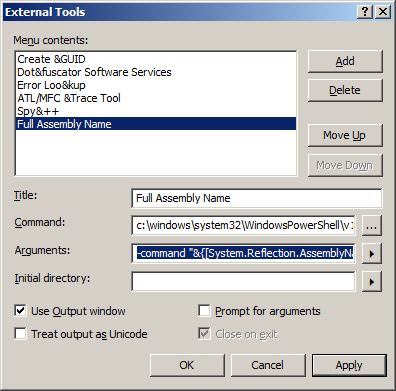
Specify “Full Assembly Name” as “Title”
-
Enter “c:windowssystem32WindowsPowerShellv1.0powershell.exe” as “Command”
-
Enter
-command "&{[System.Reflection.AssemblyName]::GetAssemblyName('$(TargetPath)').FullName}"as “Arguments”
-
Check “Use output window”
-
Click “OK”
-
You can use this tool if your output binary can be compiled(!)
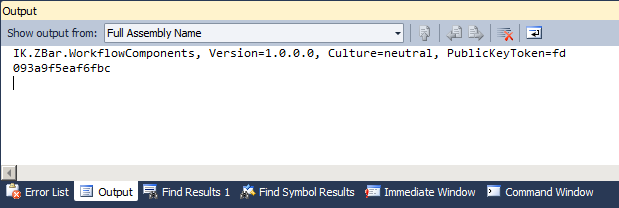
Screenshots:
3 comments
Gil Roitto Jan 15, 2011
This was far more integrated and easier accessible than what I've been using before. Very nice!
Alex_BBB Apr 26, 2011
The best! Thanks!
ikarstein Apr 26, 2011
You're welcome! :-)