k blog.kenaro.com
← All articles

Walkthrough: Create custom SharePoint 2010 list form for deployment in a Visual Studio 2010 project – PART 2

· Ingo Karstein

This is part 2 of my demo project about “How to create a custom list form…” –

See this post for part one:

https://blog.kenaro.com/2010/12/29/walkthrough-create-custom-sharepoint-2010-list-form-for-deployment-in-a-visual-studio-2010-project/

Here you can download the demo project as source code:

http://spcustomlistformdemo.codeplex.com/

Let’s start…

(See “ListDefinition2” in the demo project source!)

1. Create an new List Definition project item as described in the previous blog post (“Part 1”).

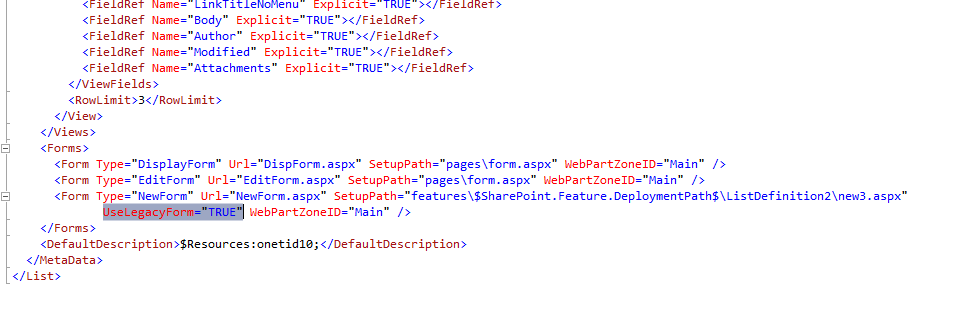
2. In the ASPX file of your list form be sure to add the attribute UseLegacyForm=”True” to your Form-Tag. – Like in this screenshot:
image

3. Then you need to create the field edit controls by yourself. Therefore you have to add some code to the ASPX file.

Here is some demo code. (The “ListDefinition2” based upon “Announcement List Template”…)

1:                 <WebPartPages:WebPartZone  runat="server"  FrameType="None"  ID="Main"  Title="loc:Main" 
2:                     Visible="true"> 
3:                     <ZoneTemplate> 
4:                     </ZoneTemplate> 
5:                 </WebPartPages:WebPartZone> 
6: 
7:                 <!-- ikarstein: Insert such a structure for each field you want to show on you page --> 
8:                 <table  border="0"  width="100%"> 
9:                     <tr> 
10:                         <td  class="ms-toolbar"  nowrap="nowrap"> 
11:                             <SharePoint:FormToolBar  runat="server"  ControlMode="New"  /> 
12:                         </td> 
13:                     </tr> 
14:                     <tr> 
15:                         <td> 
16:                             <span  id="part1">  <!-- ikarstein: This line is important for "Attachments" --> 
17:                                 <table  border="0"  cellspacing="0"  width="100%"> 
18:                                     <!-- ikarstein: Insert such a table row for each field / BEGIN--> 
19:                                     <tr> 
20:                                         <td  width="190px"  valign="top"  class="ms-formlabel"> 
21:                                             <h3  class="ms-standardheader"> 
22:                                                 <nobr> Title<span  class="ms-formvalidation">  *</span></nobr> 
23:                                             </h3> 
24:                                         </td> 
25:                                         <td  width="400px"  valign="top"  class="ms-formbody"> 
26:                                             <SharePoint:FormField  runat="server"  ID="field_Title"  ControlMode="New"  FieldName="Title"  /> 
27:                                             <SharePoint:FieldDescription  runat="server"  ID="field_Title_Description"  FieldName="Title" 
28:                                                 ControlMode="New"  /> 
29:                                         </td> 
30:                                     </tr> 
31:                                     <!-- karstein: END --> 
32:                                     <tr> 
33:                                         <td  width="190px"  valign="top"  class="ms-formlabel"> 
34:                                             <h3  class="ms-standardheader"> 
35:                                                 <nobr> Body</nobr> 
36:                                             </h3> 
37:                                         </td> 
38:                                         <td  width="400px"  valign="top"  class="ms-formbody"> 
39:                                             <SharePoint:FormField  runat="server"  ID="field_Body"  ControlMode="New"  FieldName="Body"  /> 
40:                                             <SharePoint:FieldDescription  runat="server"  ID="field_Body_Description"  FieldName="Body" 
41:                                                 ControlMode="New"  /> 
42:                                         </td> 
43:                                     </tr> 
44:                                     <tr> 
45:                                         <td  width="190px"  valign="top"  class="ms-formlabel"> 
46:                                             <h3  class="ms-standardheader"> 
47:                                                 <nobr> Expires</nobr> 
48:                                             </h3> 
49:                                         </td> 
50:                                         <td  width="400px"  valign="top"  class="ms-formbody"> 
51:                                             <SharePoint:FormField  runat="server"  ID="field_Expires"  ControlMode="New"  FieldName="Expires"  /> 
52:                                             <SharePoint:FieldDescription  runat="server"  ID="field_Expires_Description"  FieldName="Expires" 
53:                                                 ControlMode="New"  /> 
54:                                         </td> 
55:                                     </tr> 
56:                                     <!-- ikarstein: optionally add this table row / BEGIN --> 
57:                                     <tr  id="idAttachmentsRow"> 
58:                                         <td  nowrap="true"  valign="top"  class="ms-formlabel"  width="20%"> 
59:                                             <SharePoint:FieldLabel  ControlMode="New"  FieldName="Attachments"  runat="server"  /> 
60:                                         </td> 
61:                                         <td  valign="top"  class="ms-formbody"  width="80%"> 
62:                                             <SharePoint:FormField  runat="server"  ID="AttachmentsField"  ControlMode="New"  FieldName="Attachments"  /> 
63:                                             <script  language="javascript"  type="text/javascript"> 
64:                                               var  elm = document.getElementById("idAttachmentsTable" );
65:                                               if  (elm == null  || elm.rows.length == 0)
66:                                                 document.getElementById("idAttachmentsRow" ).style.display=< span> ;
67:                                             </script> 
68:                                         </td> 
69:                                     </tr> 
70:                                     <!-- ikarstein: END --> 
71: 
72:                                     <!-- ikarstein: Add this table for "Save" and "Cancel" buttons / BEGIN --> 
73:                                     <table  width="100%"  border="0"  cellspacing="0"> 
74:                                         <tr> 
75:                                             <td  width="99%"  class="ms-toolbar"  nowrap="nowrap"> 
76:                                                 <img  src="/_layouts/images/blank.gif"  width="1"  height="18"  /> 
77:                                             </td> 
78:                                             <td  class="ms-toolbar"  nowrap="nowrap"> 
79:                                                 <SharePoint:SaveButton  runat="server"  ControlMode="New"  ID="savebutton"  /> 
80:                                             </td> 
81:                                             <td  class="ms-separator"> 
82:                                             </td> 
83:                                             <td  class="ms-toolbar"  nowrap="nowrap"  align="right"> 
84:                                                 <SharePoint:GoBackButton  runat="server"  ControlMode="New"  ID="gobackbutton"  /> 
85:                                             </td> 
86:                                         </tr> 
87:                                     </table> 
88:                                     <!-- ikarstein: END --> 
89:                             </span> 
90:                             <SharePoint:AttachmentUpload  runat="server"  ControlMode="New"  /> 
91:                             <SharePoint:ItemHiddenVersion  runat="server"  ControlMode="New"  /> 
92:                         </td> 
93:                     </tr> 
94:                 </table> 
95: 
96: 

(You see my comments inline ?! Not much, I know…)

Behind  the “” tag add the HTML code.

You can add input fields by using this snipped:

1:                                     <!-- ikarstein: Insert such a table row for each field / BEGIN--> 
2:                                     <tr> 
3:                                         <td  width="190px"  valign="top"  class="ms-formlabel"> 
4:                                             <h3  class="ms-standardheader"> 
5:                                                 <nobr> Title<span  class="ms-formvalidation">  *</span></nobr> 
6:                                             </h3> 
7:                                         </td> 
8:                                         <td  width="400px"  valign="top"  class="ms-formbody"> 
9:                                             <SharePoint:FormField  runat="server"  ID="field_Title"  ControlMode="New"  FieldName="Title"  /> 
10:                                             <SharePoint:FieldDescription  runat="server"  ID="field_Title_Description"  FieldName="Title" 
11:                                                 ControlMode="New"  /> 
12:                                         </td> 
13:                                     </tr> 
14:                                     <!-- karstein: END -->
15: 

Of course you can change the page design. You only need the tag “SharePoint:FormField”, optionally “SharePoint:FieldDescription”. In every case the “FieldName” Attribute represents the List field the input field is connected with.

You do not need to create any Code Behind!

Just add “SharePoint:GoBackupButton” for cancel and “SharePoint:SaveButton” for submit.

Furthermore you have some controls for adding attachments to your List item.

AND: It’s the same for “Edit” list form. You only need to change the attributes “ControlMode” to “Edit”… Totally easy, isn’t it?

4. Deploy it and have a look…

72 comments

Nigel Jan 27, 2011
hi, When I run the list definition 2 example from the codeplex project, the new form does not show a 'Body' control or an 'Expires' control - just the labels? Also, I would like to see the deom expanded to show some controls added that are not FormField controls - e.g. NoteField, DateTimeField, LookupField etc. Any chance of doing this do you think? Cheers, Nigel
I followed the above approach and build my custom list , i am stuck at saveing the item. I have identified that when is like this in custom list form aspx page, then i am seein the page with extra column is coming along with my custom list title form field. Please help me
Christian Mar 2, 2011
Hi, very nice Post!!! but i have this error when i'am trying to attach a file: This form was customized and attachments will not work correctly because the HTML 'span' element does not contain an 'id' attribute named 'part1.' Any idea on how i can resolve this? Thanks and sorry for my bad english! Christian
Christian Mar 2, 2011
oups... sorry, stupid question... now it's working...
Mano Mar 25, 2011
Very nice find.. thanks.
Ands fenomen Apr 4, 2011
It's perfect!!! Thanks a lot! I could make this for New and Edit form. But this can be done for Display form. I followed all the steps, but couldn't get it works. Please help in advice! Ands fenomen
Ands fenomen Apr 4, 2011
Just some ramark for my post... I can't make this for Display Form
ikarstein Apr 4, 2011
Hi Ands, it should work the same way as for New and Edit form. Did you set the "ControlMode" in the ASPX file to "Display"? Ingo
tguillory@gmail.com Apr 4, 2011
I tried adding a control like to the code behind, but I can't get a reference to it in the code? Or ANY control for that matter? Are the form entry controls inside a different scope in this form?
ikarstein Apr 4, 2011
please post your code. It's difficult for me to answer you question. I've done creating Display forms before successfully. there must be a bug in your code ;-) Ingo
Tag Apr 4, 2011
<%@ Assembly Name="$SharePoint.Project.AssemblyFullName$" %> <%@ Page Language="C#" AutoEventWireup="true" CodeBehind="LeaveRequestAddForm.aspx.cs" Inherits="ESCG.Sharepoint.Layouts.ESCG.Sharepoint.LeaveRequestAddForm" MasterPageFile="~masterurl/default.master" %> <%@ Register Tagprefix="SharePoint" Namespace="Microsoft.SharePoint.WebControls" Assembly="Microsoft.SharePoint, Version=14.0.0.0, Culture=neutral, PublicKeyToken=71e9bce111e9429c" %> <%@ Register Tagprefix="Utilities" Namespace="Microsoft.SharePoint.Utilities" Assembly="Microsoft.SharePoint, Version=14.0.0.0, Culture=neutral, PublicKeyToken=71e9bce111e9429c" %> <%@ Import Namespace="Microsoft.SharePoint" %> <%@ Assembly Name="Microsoft.Web.CommandUI, Version=14.0.0.0, Culture=neutral, PublicKeyToken=71e9bce111e9429c" %> <%@ Register Tagprefix="WebPartPages" Namespace="Microsoft.SharePoint.WebPartPages" Assembly="Microsoft.SharePoint, Version=14.0.0.0, Culture=neutral, PublicKeyToken=71e9bce111e9429c" %> ... <tr> <td width="190px" valign="top" class="ms-formlabel"> <h3 class="ms-standardheader"> <nobr>Employee</nobr> </h3> </td> <td width="400px" valign="top" class="ms-formbody"> <SharePoint:EntityPicker runat="server" ID="employeeCtrl" ControlMode="New" /> <SharePoint:FieldDescription runat="server" ID="employeeDescription" FieldName="EmployeeField" ControlMode="New" /> </td> </tr>
Tag Apr 4, 2011
I just want to get a reference to employeeCtrl in the codebehind so I can set the data from a BDC. Even FindControl doesn't seem to work. The CodeBehind and Inherits attributes are correct.
ikarstein Apr 4, 2011
To get a reference, you have to define the Control in the class definition of the code behind class file as a class member. Without such a definition the control is not available in your code. - To see what I mean just add a new Application page and create a control in the ASPX file. Than open the Designer generated file that defines the "partial class". There you should find the code behind definition of the control you added in the ASPX file. In the same way you create a class member definition for your EntityPicker control. - This control does not have a "ControlMode" property. Have a look at MSDN: http://msdn.microsoft.com/en-us/library/microsoft.sharepoint.webcontrols.entitypicker\_members.aspx Ingo
Tag Apr 5, 2011
Stupid me. Yea. Fixed it. Thanks. OK. Hum, maybe I'm beating down the wrong path. One of the fields in my list is the value from a BDC source (which is a list of entities). I was going to populate the EntityPicker from the external list. I know I can do all this in Designer, but I want to do it from VS 2010.
ikarstein Apr 5, 2011
Hi! Thats not easy, I think ;-) I'll see how to do that (BCD field). But this will take a while... I'm (glad to be) in projects at the moment :-) Ingo
Tag Apr 5, 2011
Opps. Actually, I think I want to do a custom PickerDialog. EntityPicker pops-up a dialog of all the entities in the site.
Panda May 27, 2011
Do you know how I could use a radio button list to populate a text field, such as Title? I have been trying this in Designer for quite some time with no success. I basically deleted the SharePoint:FormField and replaced it with all kinds of different attempts, such as html radio buttons, asp radio buttons, asp radio button list, SP data view radio button lists, and I've tried messing around with the SharePoint:RadioButtonChoiceField, but I keep running in to some kind of problem. I want three radio buttons and whichever is selected, the value populates the Title field. Thanks in advance!
ikarstein May 27, 2011
Hi Panda! I would do this as like this: 1\. Customize the List Form in SharePoint Designer 2010 in Advanced Mode. 2\. Use ths jQuery library (link the JavaScript library in the List Form ASPX page). jQuery 3\. Encapsulate the "Title" FormField tag with and give the DIV an ID, e.g. "MyTitleDIV" 4\. Set the "Title" FormField to be hidden by using CSS inline style "display:hidden" 5\. Create the radio buttons below the "Title" FormField 6\. Assign a "OnChange" event to the radio buttons 7\. In the "OnChange" event handler set the FormField's value. The FormField is rendered as tag I think. Use jQuery to find the INPUT control, e.g. `$("#MyTitleDIV).find("input:first").val( xyz );` where "xyz" is the value you would like to set for the "Title" field. That should work. - I've done such modifications using this method. I hope this helps! - Please let me know how you've done it. Kind regards Ingo
Panda Jun 3, 2011
IKarstein, I basically did what you said, but regular javascript - no jQuery. Thanks! Now I will be trying out this method of creating the list form in VS. If it works, Super helpful post!!!
Panda Jun 3, 2011
Is there a way to create a project to customize a list form or set of list forms for a list that already exists? It looks like this method described in part 1 shows how to create a new list and then customize the list form, but I need to customize a current list's form.
Justiin Mar 15, 2012
Hi Panda, did you ever find out about customizing an existing list form? Regards Justin
enti Jun 30, 2011
Hello. Please I have one special question. I have created also Edit Form like you wrote in this article and also I have changed ControlMode to Edit. Is possible to bind data to this custom edit form? For example my row in edit2.aspx look like: But when I open this form in sharepoint(I want to edit some row) There is't my value but this text: "Title field value".Hmm.... Is possible to bind data to this form without C# code? PS: When I created custom form in sharepoint designer everything was working and the actual data was there...
enti Jun 30, 2011
I am very sorry but I try everything and I don't understand this. In my edit2.aspx form I have also savebutton: SharePoint:SaveButton runat="server" ControlMode="Edit" ID="savebutton" ControlMode is set to EDIT.....But when I open some content for editing and press Save button...It didn't update the content but it add another row to SharePoint list. What I need to change in may new edit2.aspx created from base EditForm.aspx so it will works like standard EditForm. The data will be filled and the Save will update the row. Do I need to add to edit2.aspx something special for this.... some type of binding webpart? Thank you very much for help.
enti Jun 30, 2011
Hello. I have created everything again step by step and right now is everything working also for edit form. Sorry for my previous post. You can simply remove it because right now binding works and also update works perfect. Again and Again Thank you for your blog and sorry.
ikarstein Jul 1, 2011
Hi Enti! it's great! you solved it on your own! - I've approved all of your comments just to show your problem and \*your\* solution. It's ok, isn't it? Kind regards Ingo
Phil Jul 27, 2011
Hi I have a requirement to display a field on the table dependant on the value of on of the fields. However I am struggling on how to assign the field valve to a variable. Is this possible? My sample code is below: This works at present, but I want to change the int d =2: line to that it accepts a field as the variable. I had tried int d =; but it will not accept it. Can you help? Cheers, Phil
Phil Jul 27, 2011
My code...not sure where it went before. <% int d = 2; if (d == ()) { %>
Phil Jul 27, 2011
third time lucky,.. <% int d = 2; if (d == ()) { %>
ikarstein Aug 3, 2011
Phil, I'm not sure that I understand your need. Sorry. You want to assign the value of a SharePoint List Item Field to a variable at a ASPX page?? - Some questions: A) What kind of page do you have (list view page, application page, ...)? B) What kind of SharePoint List Item do you use (which content type)? C) Whats the data type of the field? Maybe you need to use SPContext.Current.Item\[\] where you replace with the internal field name ;-) E.g. SPContext.Current.Item\["Title"\]. This lets you access the value of the field "Title" of the current List Item. But SPContext does not work in every context ;-) I'd like to help you. But thats all what I can do for you at the moment. Kind regards ingo
Phil Aug 4, 2011
Hi, I'll try to explain myself better. I have created a custom list which amogst other fields holds a 'statusID'. For this list I have created a custom form, using your guide ;-) On the add new item form, the status id is a required field (its a lookup from another field actually). Now my issue. When I click on my custom view form I would like row on my table to have Status: then based on the StatusID and image (30 green, something similar to KPI indicators). Therefore I need to pass the StatusID field into a variable then perform some logic so that dependant on the value I can display the correct image. Does that make more sense? The page I am working on is the 'custom display form aspx page. The field is held within a list content type. The field is a type number. Hope this makes my problem clearer. Any help would be greatly appreciated. Phil
Phil Aug 4, 2011
This might help.. <asp:Image ID="imgMyImage" runat="server" ImageUrl='' /> Found this online
enti Aug 14, 2011
Hello. With your article help I have generated also for EXTERNAL LIST these forms...Almost Evrything is working but I have one problem..... If I define UseLegacyForm=”TRUE” this external list ignore this and still will generate for my forms in WebPartZone fields...If I set up for WebPartZone visibily="false" everythig is OK and I can generate my own fields but ribbon menu is only readonly....Evrything was working with my custom list but in external list I have these problems....I don't know why external list still ignore UseLegacyForm=”TRUE” and still generate fields....Hmm....Can you please help me with this...Thank You
Jerome Aug 16, 2011
Hi, Thanks a lot for this nice post. But... For the WebPartZone HTML tag, wouldn't it be "visible=false" instead of "visible=true" ? Regards, Jerome.
Matthew Sep 6, 2011
This is working really well for me, thanks! But one issue that's driving me crazy.... after I set UseLegacyForm="TRUE" I find the ribbon controls on the 'Display' mode are showing all sorts of irrelevant icons: Check In/Check Out (this isn't enabled on the list), Approve/Reject, Manage Copies, Workflows, Claim Release, Delete Item Version, Restore Item Version, Health Run Now, Reanalyze Now, Repair Automatically, and Activate, Deactive and Upgrade! How can I get it to just display the standard (Edit Item, Version History, Manage Permissions, Delete Item, Alert Me)?
Matthew Sep 6, 2011
Couldn't find a simple way to achieve this so ended up individually trimming all the extra icons from the ribbon. This is working well. I'll post it here for anyone else who notices the same thing: On the Page\_Load of your custom form add the folowing: SPRibbon rib = SPRibbon.GetCurrent(this); if (rib != null) { rib.TrimById("Ribbon.ListForm.Display.Manage.EditSeries"); rib.TrimById("Ribbon.ListForm.Display.Manage.CheckIn"); rib.TrimById("Ribbon.ListForm.Display.Manage.CheckOut"); rib.TrimById("Ribbon.ListForm.Display.Manage.ApproveReject"); rib.TrimById("Ribbon.ListForm.Display.Manage.ManageCopies"); rib.TrimById("Ribbon.ListForm.Display.Manage.Workflows"); rib.TrimById("Ribbon.ListForm.Display.Manage.EnterFolder"); rib.TrimById("Ribbon.ListForm.Display.Manage.ClaimReleaseTask"); rib.TrimById("Ribbon.ListForm.Display.Manage.DistributionListsApproval"); rib.TrimById("Ribbon.ListForm.Display.Manage.DeleteItemVersion"); rib.TrimById("Ribbon.ListForm.Display.Manage.RestoreItemVersion"); rib.TrimById("Ribbon.ListForm.Display.HealthActions"); rib.TrimById("Ribbon.ListForm.Display.Solution"); }
Ronak Sep 27, 2011
Thanks ikarstein for sharing knowledge and this is very useful post. I have created Custom form for New and Edit item for all my lists in SPD 2010 now i want to deploy them through VS 2010 and i found your post but i have couple of Question. 1.Do i have to remove \_\_designer:bind ="" from Code generated By SPD ? 2.In all these custom forms i have one field which is lookup to Department list so what i have done is change this field to TextBox from FormField and then bind this TextBox to Querystring which is DepartmentID and then hide this field so user dont have to select DepartmentID.Here is code for it Cost Center Do i need to copy and paste same code or i need to do this code behind ? Please advise Thanks Ronak
Toney Oct 6, 2011
I am working on doing this for a custom list instance in VS 2010. I have the list instance pointing to a CustomSchema and therein I have the Forms element pointing to my custom form. It works well and I thank you for this. However, the attachments do not work: "Failed to get value of the "Attachments" column from the "Attachments" field type control. See details in log. Exception message: Guid should contain 32 digits with 4 dashes (xxxxxxxx-xxxx-xxxx-xxxx-xxxxxxxxxxxx).. ". I did include the span with the part1 id. Any help would be greatly appreciated.
Toney Oct 6, 2011
Nevermind. I changed the schemal for it's custom "item" content type node to have instead of templates and added the fieldRefs to the content type node and it seems to be working now. Sharepoint is so very convoluted (and I've been doing it for years).
Lana Oct 7, 2011
Hi, thank you for you Post. It's great! I have a quesitons How can I validate data in my dropdowns controls on saveButton click event? Looks like I don't have access to click event. I have requirements to validate one field based on value of other. For example When Name="TEST1" I want field Code be mandatory in all other cases empty value is allowed. Can you please suggest best way to implement it? Name Name
Raul Mesquita Nov 29, 2011
Hi, I have tried this solution and now im having a problem with master pages. When i change V4.MasterPage in sharepoint designer it gives error when i open my new custom form for my list. The error im obtaining is that AutoEventWireUp cannot be true. But if i delete this settings i get other errors. Have anyone come to errors like these? I cant change nothing in the V4.Master.
Phil Nov 30, 2011
Hi, Is there a way of changing the default width of the modal dialog on opening? I would like to add some custom buttons to the form but need it wider to place all the buttons. Cheers,
ikarstein Dec 22, 2011
Hi! - You mean a JavaScript SharePoint dialog? Try this: function adderWithScriptDlg() { var options = { url: SP.Utilities.Utility.getLayoutsPageUrl('your\_layouts\_page.aspx'), title: "My Dialog", width: 400, height: 300, dialogReturnValueCallback: Function.createDelegate(null, function (dialogResult, returnValue) { //executed in case of success }) } SP.UI.ModalDialog.showModalDialog(options); } Ingo
satish Dec 4, 2011
Great post. But i have question, how can i set an application page which contains its fields & some codebehind as newform2.aspx?
Leo Feb 28, 2012
Is there any way I could override the save button? What I wish to achieve is when the user submit the form I want it to prompt the form is submitted and stay on the same page instead of redirecting it back to the list library. My idea was to hide the user from accessing the list directly.
ikarstein Mar 1, 2012
Hi! you have to implement your own save button. but you could implement a site page or application page for your requirements. Than you have to implement your own save mechanism. But in way you can prevent the user from accessing the list directly. You could protect the list by using special permissions and save data to the list by using "RunWithElevatedPriveledges". Ingo
Sybil Mar 1, 2012
My custom newform pages are loading slowly. Any ideas?
ikarstein Mar 1, 2012
sybil- without reviewing the code I cannot say anything about that. sorry. ingo
Thanks a lot for great post. I have a question, when I follow your instruction for New DocumentSet Application Page, I got following error on Save Button Click Event. Could not find FileField control. do you know what can be the issue.
Engine Apr 9, 2012
After UseLegacyForm=”True”, the controls are still there. What's wrong?
Christophe Sep 6, 2012
Probably you already found the answer but True should be written in capitals...
Stephane Beaudet Jul 27, 2012
you might want to modify the post, it is important to use UseLegacyForm=”TRUE”, the "True" must be in all caps or else the old form stays present and if you try to hide it, using visible="false", the Save Button won't work because it tries to post the old form.
Daniel Aug 4, 2012
I've found http://spform.com. Forms designer for sharepoint online provides UI-interface to customize forms. It creates custom form pages automatically. You can change then its markup with sp designer
ikarstein Aug 9, 2012
looks cool! thanks!
Sridhar Aug 24, 2012
Great Post. It worked for me. Thanks a lot. I would like to have validation of the controls on click of the Save button, I tried using javascript, it didnt work for me. Can you suggest me any approach, if you have, to perform validation on the page?
ikarstein Aug 24, 2012
Hi! Look here: http://karinebosch.wordpress.com/sharepoint-controls/sharepoint-validation-controls/ There are SharePoint Validations Controls... - You can use jQuery but you need to use the IDs of the controls \*after\* rendering. Neither "FieldID" nor "ID" of the Control. In some situaltions I use http://bassistance.de/jquery-plugins/jquery-plugin-validation/ Regards Ingo
perp1exed Sep 26, 2012
Thanks for the article - I was able to create my custom form and it works great! However I have one issue - my field descriptions do not show on the form i is this because I am using ControlMode=Edit??? Would be really useful to have the descriptions so if you are able to shed some light on what may be the problem I would be greatfull. thanks!
perp1exed Sep 26, 2012
In case you need to look at the markup: : <SharePoint:EncodedLiteral ID="EncodedLiteral1" runat="server" text="" EncodeMethod="HtmlEncode"/> <SharePoint:EncodedLiteral ID="EncodedLiteral2" runat="server" text="" EncodeMethod="HtmlEncode"/> <SharePoint:SPLinkButton id="idNavLinkViewAll" runat="server" NavigateUrl="~site/\_layouts/viewlsts.aspx" Text="" accesskey=""/> <SharePoint:SPLinkButton runat="server" NavigateUrl="~site/\_layouts/viewlsts.aspx" id="idNavLinkSiteHierarchy" Text="" accesskey=""/> <SharePoint:SPLinkButton runat="server" NavigateUrl="~site/\_layouts/viewlsts.aspx" id="idNavLinkSiteHierarchyV4" Text="" accesskey="" CssClass="s4-qlheader" /> <SharePoint:SPLinkButton runat="server" NavigateUrl="~site/\_layouts/recyclebin.aspx" id="v3idNavLinkRecycleBin" ImageUrl="/\_layouts/images/recycbin.gif" Text="" PermissionsString="DeleteListItems" /> <SharePoint:ClusteredSPLinkButton runat="server" NavigateUrl="~site/\_layouts/recyclebin.aspx" ImageClass="s4-specialNavIcon" ImageUrl="/\_layouts/images/fgimg.png" ImageWidth=16 ImageHeight=16 OffsetX=0 OffsetY=428 id="idNavLinkRecycleBin" Text="" CssClass="s4-rcycl" PermissionsString="DeleteListItems" /> <SharePoint:ClusteredSPLinkButton id="idNavLinkViewAllV4" runat="server" PermissionsString="ViewFormPages" NavigateUrl="~site/\_layouts/viewlsts.aspx" ImageClass="s4-specialNavIcon" ImageUrl="/\_layouts/images/fgimg.png" ImageWidth=16 ImageHeight=16 OffsetX=0 OffsetY=0 Text="" accesskey=""/> Document Description Discipline Topic Publication Type Document Source Tag Fiscal Year Document Language Rating Country Document Tags var elm = document.getElementById("idAttachmentsTable"); if (elm == null || elm.rows.length == 0) document.getElementById("idAttachmentsRow").style.display='none'; if (document.getElementById("onetidPageTitleAreaFrame") != null) { document.getElementById("onetidPageTitleAreaFrame").className = "ms-areaseparator"; } .ms-bodyareaframe { padding: 8px; border: none; }
perp1exed Sep 26, 2012
Yikes, that didnt turn out welll at all! :O
Ns Oct 1, 2012
its very good Example.. But, i have to add a Tag/Label/Textbox in upload.aspx page of Sharepoint Document Library which is created as List Defination. how can i achive this...
Paramdeep Singh Oct 22, 2012
I have created a form structure and I have kept the tag empty but at runtime the fields are again added in the form. Please help.
udit Feb 25, 2013
Hi, its a very informative post. Thanks for walking through step by step. I am having trouble to configure the custom form for document library with multiple content types attached. Using SharePoint:ChangeContentType control shows renders the dropdown but nothing happens on selecting a different content type. How to fix this?
Jan Feb 27, 2013
Hi, your example is very nice and worked for me, but I have one problem: in the EditForm, the Save and Cancel button in the Ribbon are doing nothing. Do you perhaps have any idea onto this issue?
Jan Feb 27, 2013
Hi again, solved it. I had set the original webpartzone on visible=false. Now the button wants to work with this form but cannot. You need to use display:none instead.
Debopam May 11, 2013
Awesome tutorial dude. very helpfull
Kshitti Jul 16, 2013
I have used your method for deploying my custom form and its great. Thanks....But i want to use the fields in my new.aspx.cs form because i want to display the choices of dropdown dynamically depending on the user logon...Please suggest how can i do it...????
ikarstein Jul 16, 2013
short answer: add your own html dropdown. fill it on GET in code with the users values. write the selected value to the field on postback in your code. remove the sharepoint field from the aspx. this should do. :-)
Kshitti Jul 16, 2013
Can i use Event receiver to fire an event on Add or Edit form Action to change the values of field on a display form........Is there some event for it
Rick Jul 27, 2013
Hello all, Nice article! It's been a lifesaver. I've been using the technique a lot recently. However, I find myself in a bit of a quandry: I would like to prefill the fields of one of my forms with information I obtain from another ListItem. In a nutshell, I have a custom action that should pull information from a parent list item and copy basic information into this new list item so that the user doesn't have to fill them in manually, and yet these are information that can potentially change from the first list item to the second. I was hoping to do this during the Page\_Load event of the form - obtaining the current list item is easy, but calling the Update() method of the item causes an error (Updates called during Get are disabled) - which makes sense I suppose. I've thought of setting the values using jQuery, which isn't too hard until you get to multi-value lookups. However -- does anyone have any experience with a more elegant way of doing this? It feels a bit... Janky. Any suggestions welcome! Cheers, Rick.
Amit Nov 1, 2013
Hi Guys, I am new to sharepoint development and I need help in similar note. I have a custom requirement, for example in the new list item form using Visual Studio 2010 for Sharepoint 2010 - I need to have text box search field, based on the search criteria, upon Search button click, I have to go to sql database and bring the matching record(s)(Name(text), EmployeeId(Value)) and show them in a drop down list. Upon one employee selection from the drop down list again I need to go the database(or I can grab everything in first trip and have it available) and grab the other fields like (badge number, supervisior, current department, and so on) and pre-populate the these other fields in the form. Then other remaining feilds are filled by user(HR) like department they are transffering to and so on, upon Save the item will be inserted in the list. I believe the list table will be created automatically upon custom list form design which is developed in share point project through visual studio 2010 or will I have to do anything to create this table in sharepoint database. Any help on this be greatly appreciated. Thanks very much in advance.
Ashok Kumar Mar 19, 2014
I am trying to create a custom form that will push data to multiple lists. Please let me know if this is possible with this approach.
Conax May 17, 2014
Thanks for the great post. I'm trying to do something like this but with code-behind to handle special business logic. If I use can I still reference the fields in code behind? Or is SharePoint going to use it's own code for the controls anyway?
Balebel May 19, 2014
Hi, Thank you for sharing this article. But, what about read only field ? In sharepoint designer we can do But, this doesn't work using this method. Help me please

Leave a comment

Your comment is reviewed before it appears. Your name is shown with the comment; your email is required for moderation but never published.