k blog.kenaro.com
← All articles

Walkthrough: How to move or copy a SharePoint Designer 2010 List Workflow to another list on the same site or another site.

· Ingo Karstein

I had to develop a Holiday Approval Workflow with SharePoint Designer 2010. – I used a “List Workflow”. – Bad mistake! – It’s not possible to copy this kind of workflow to another list on the same site or another site.

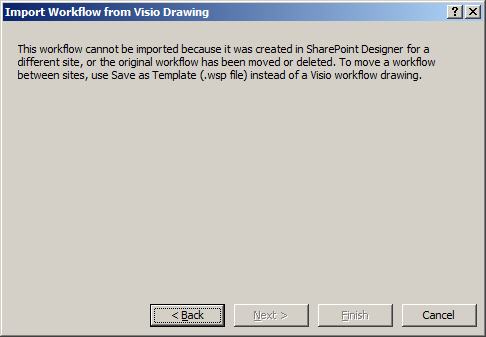
I thought I could use the “Export to Visio” functionality with the workflow at my development site and the “Import from Visio” functionality at the destination list. – That’s impossible. You get this message:
image

(“This workflow cannot be imported because it was created in SharePoint Designer for a different site, or the original workflow has been moved or deleted. To move a workflow between sites, use Save as Template (.wsp file) instead of a Visio workflow drawing.”)

You cannot “Save as Template” because it’s a “List Workflow”.

Okay. – I’ve found a workaround.

Let’s do it in detail.

1. Create a site collection “http://sharepoint.local/sites/dev”.

2. Open SharePoint Designer 2010. Open the previously created site.

3. Open the “Workflows” view.

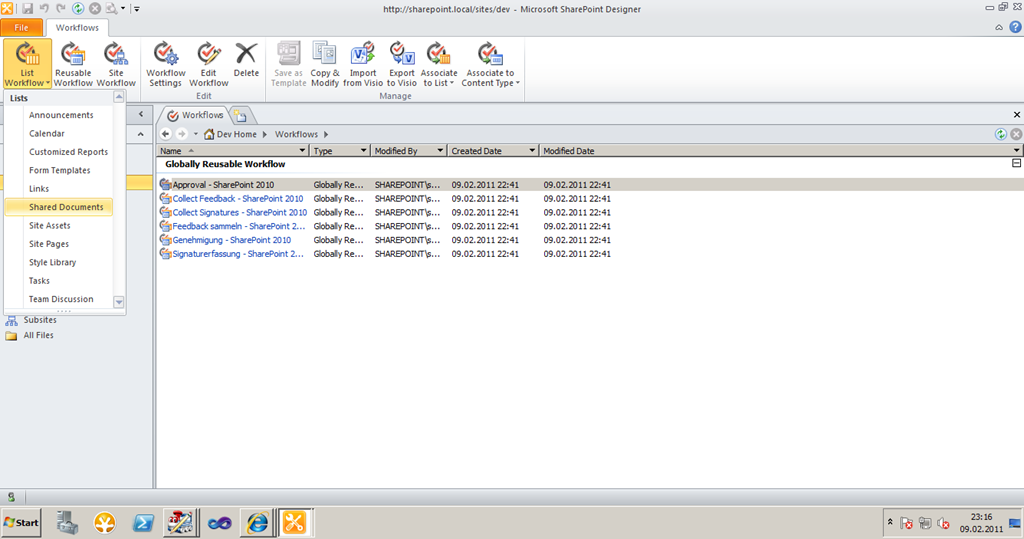
4. On the Ribbon click “List Workflow” and select “Shared Documents”. – We will create a workflow for the list “Shared Documents”.
image

Name the workflow “Workflow 1”. Leave “Description” empty.
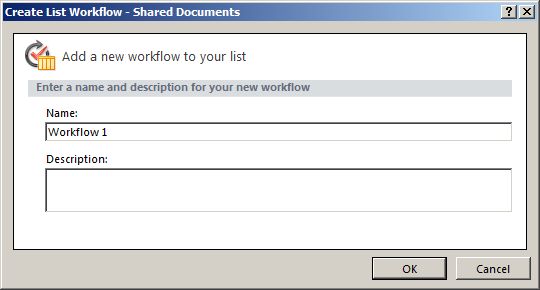
image

5. Insert any workflow steps you like.
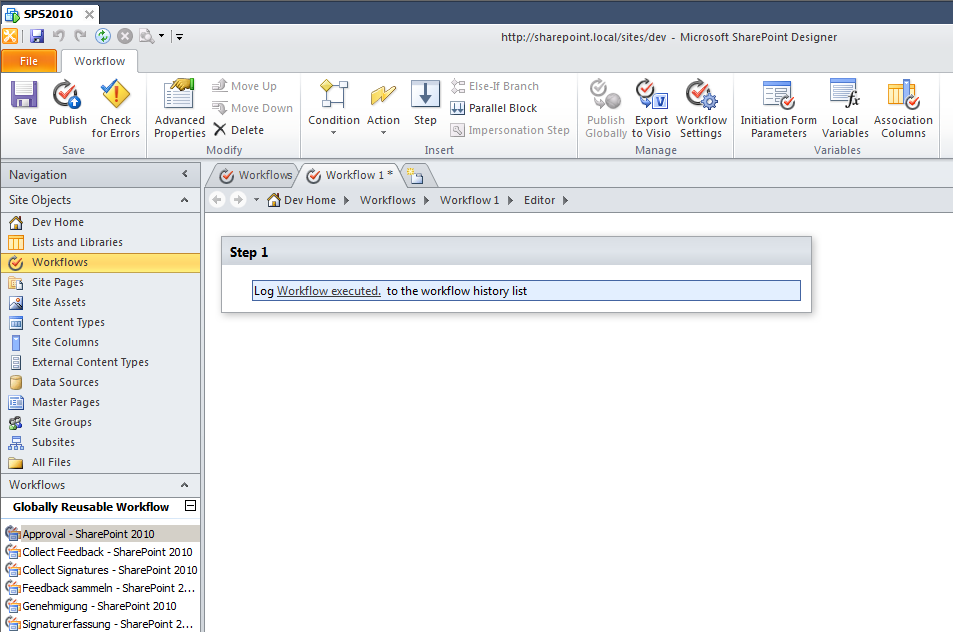
image

6. Change the workflow settings. Select “Task List” and “History List”.
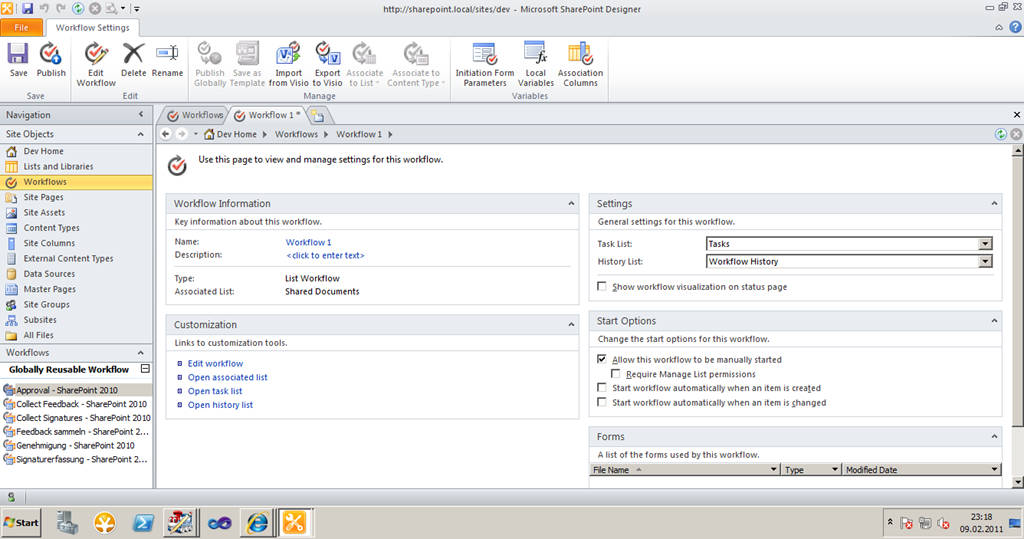
image

7. Click “Publish” to publish the workflow Winking smile

8. Click “Export to Visio”. Save to Workflow as .vwi file, e.g. on the desktop.
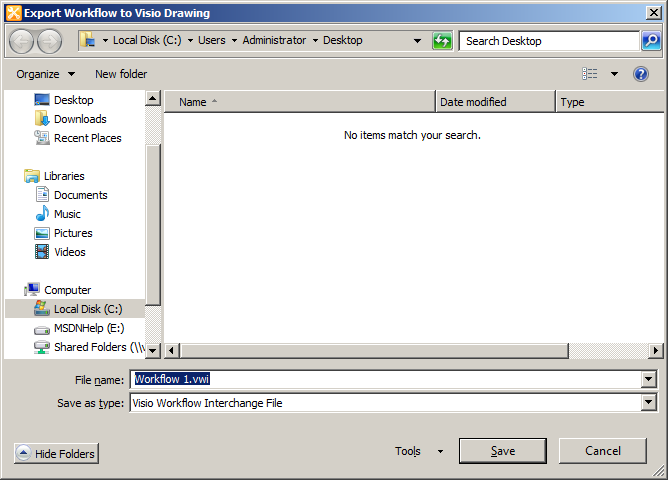
image

9. Let’s test the workflow. – I’ve created a text file “test.txt” on the desktop. Now I upload the file to the “Shared Documents” library of “http://sharepoint.local/sites/dev”.

image

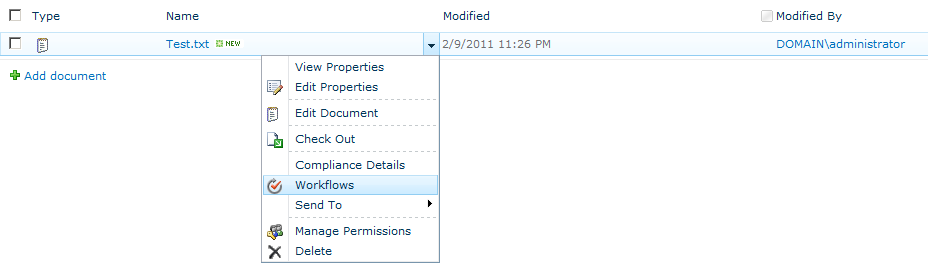
Open the item context menu. Click “Workflow”.

image

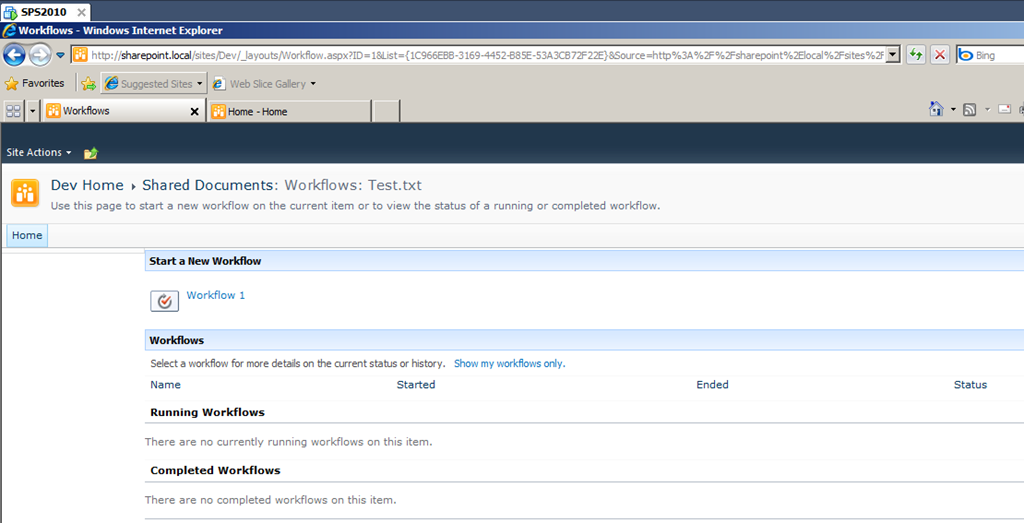
Manually start the “Workflow 1”.

*image

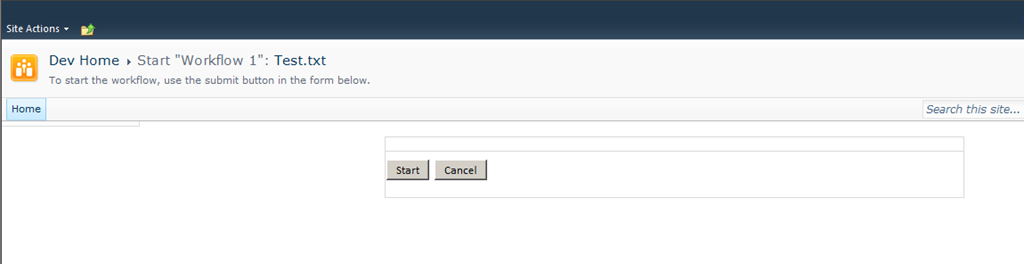
Click “Start”.

image

In the list view you see the workflow status.

image

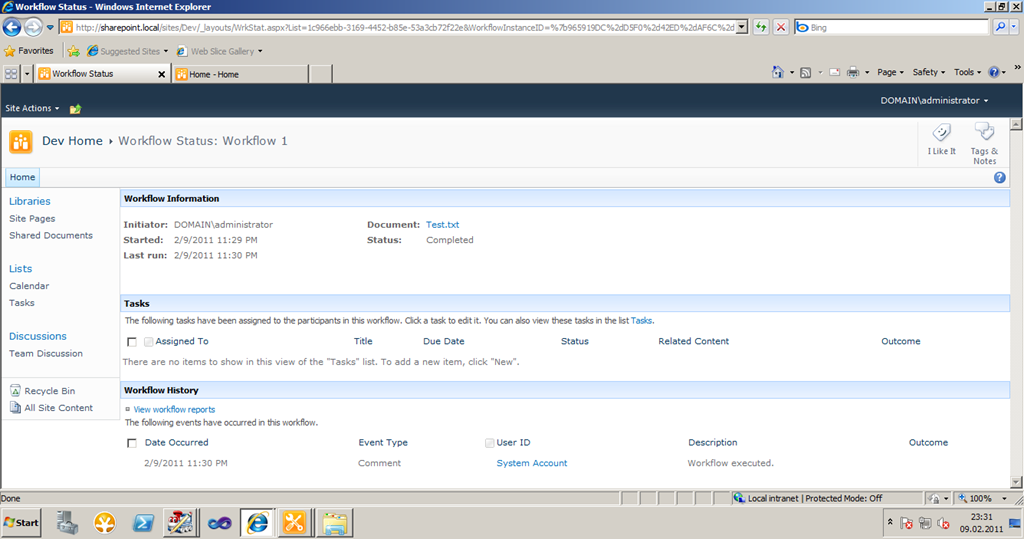
Click on the status. In my case it’s “Completed”.

image

The workflow history says “Workflow executed” as specified in the workflow definition above.
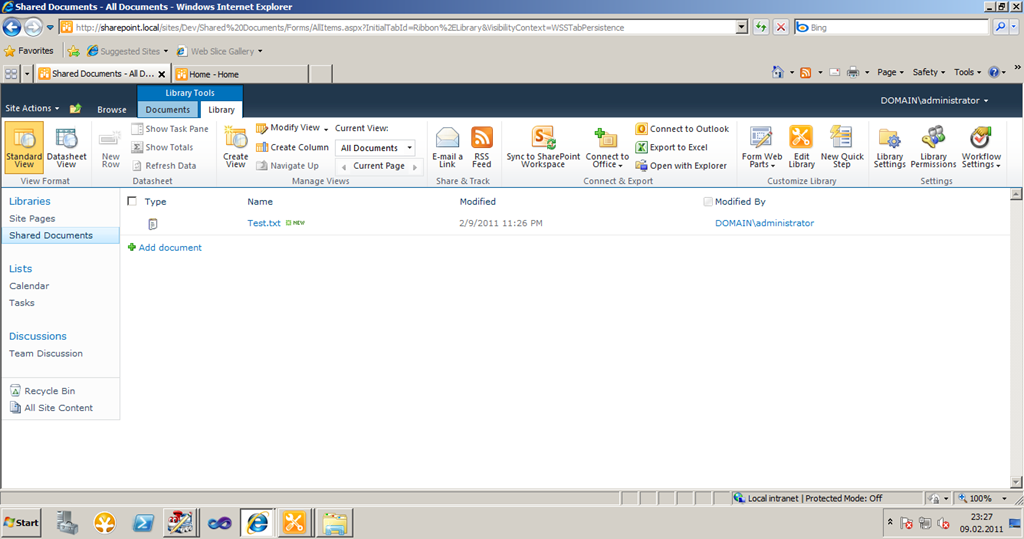
10. Okay. Let’s copy the workflow to the production site “http://sharepoint.local”. – A simple “import” is impossible, because it’s a list workflow… Follow my steps.

11. Start the SharePoint Designer 2010 and open the site “http://sharepoint.local”.

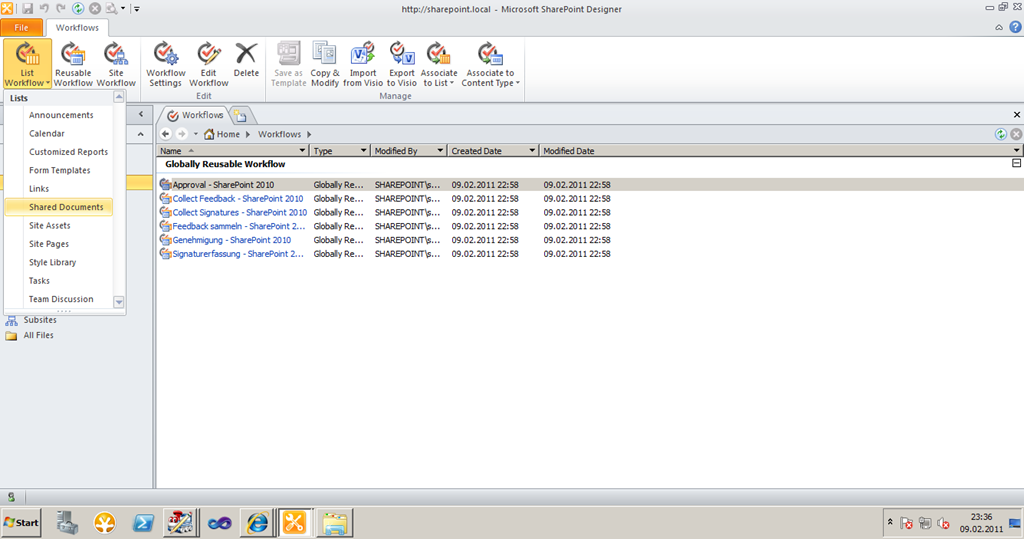
12. On the Ribbon click “List Workflow” and select “Shared Documents”. – We will create a workflow for the list “Shared Documents”.
image

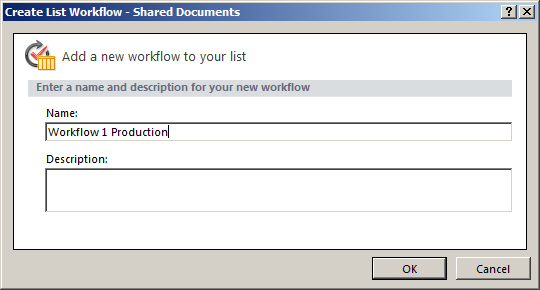
Name the workflow “Workflow 1 Production”. Leave “Description” empty.
image

11. Do not add any workflow step!

12. Click on “Workflow Settings” menu item on the Ribbon.

13. Click “Publish” to publish the (empty) workflow.

14. After publishing click “Export to Visio” and save the file as “workflow 1 production.vwi” on the desktop.

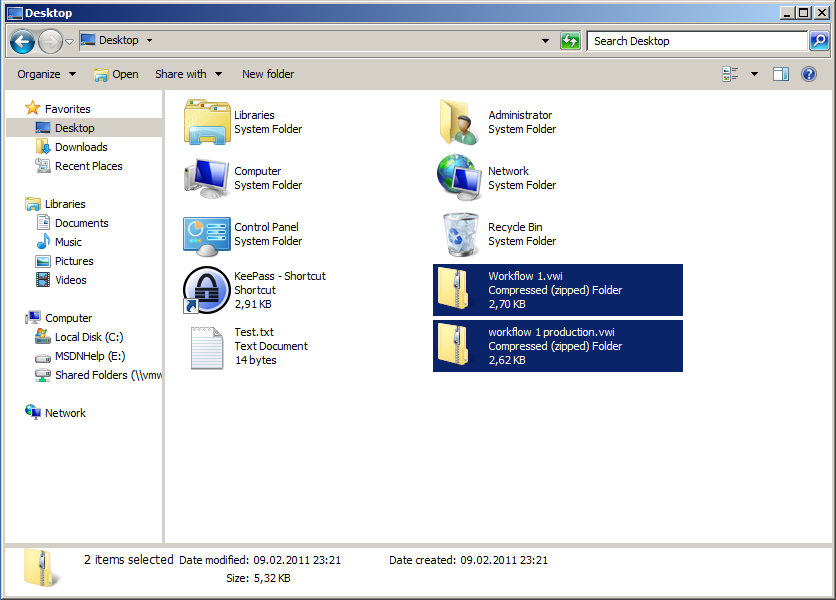
15. Open a Windows Explorer. Select “Desktop”. You see both “.vwi” files.

16. Add the extension “.zip” to both files.
image

17. Open both “.vwi.zip” files. You see:
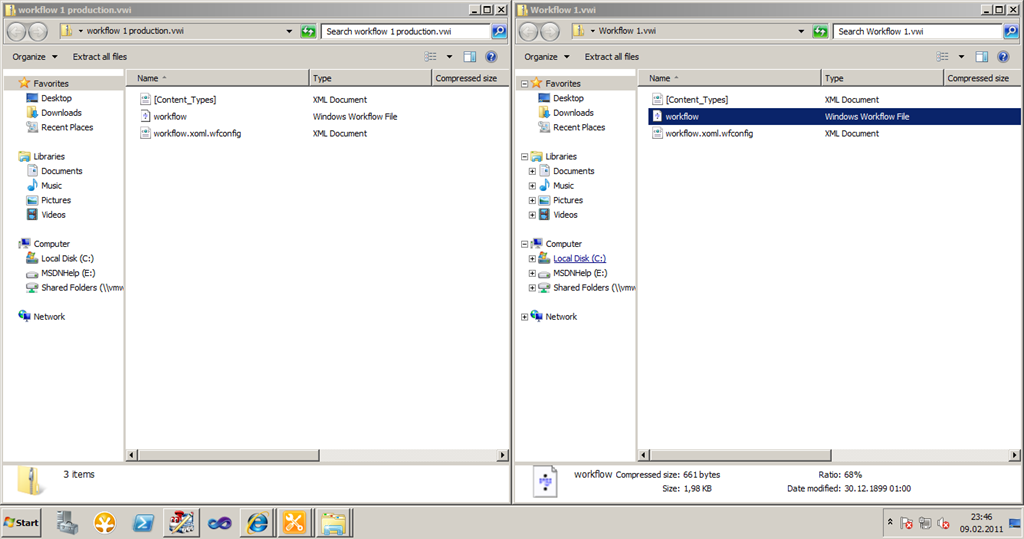
image

18. Copy “workflow.xoml.wfconfig” from “workflow 1 production.vwi.zip” to “workflow 1.vwi.zip”.
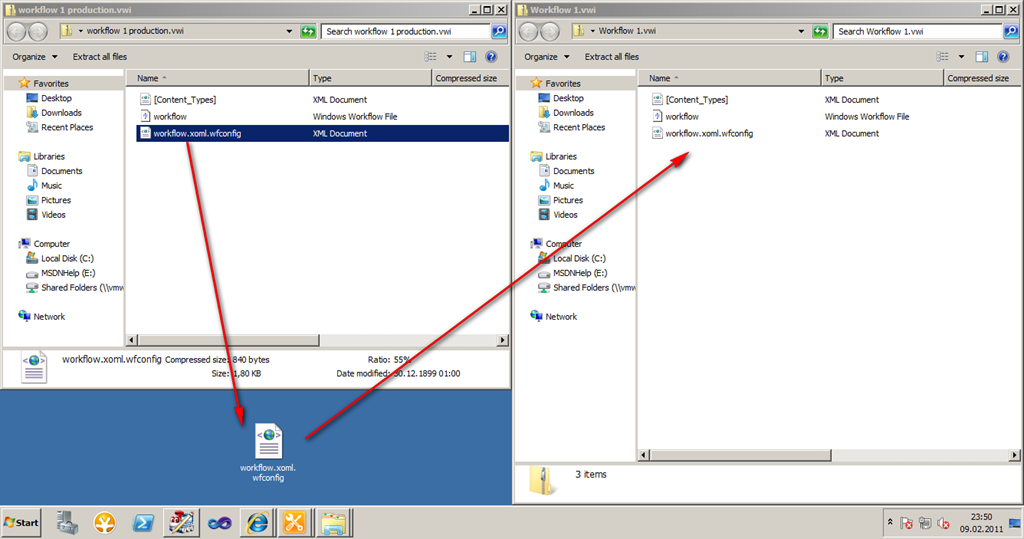
image

19. Now remove the “.zip” extension from both files. You’ll get two “.vwi” files.
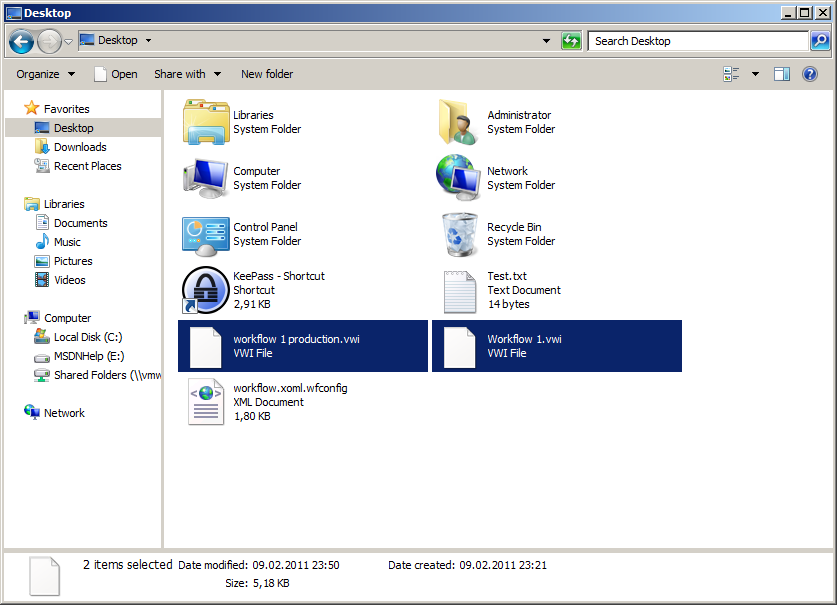
image

20. In SharePoint Designer 2010 open the site “http://sharepoint.local”.

21. Click “Import from Visio” and select “workflow 1.vwi”
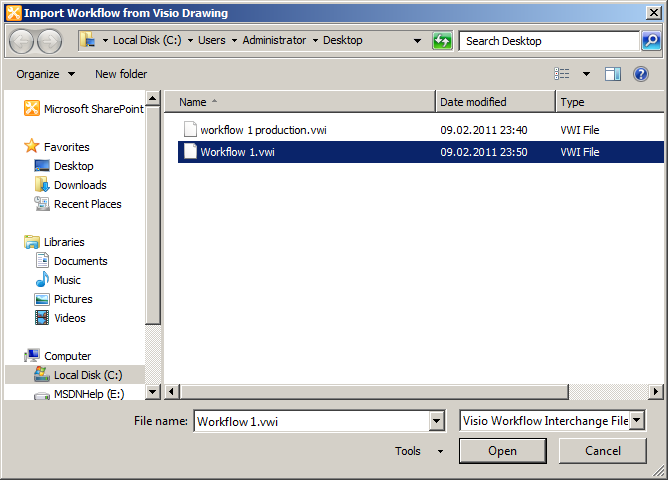
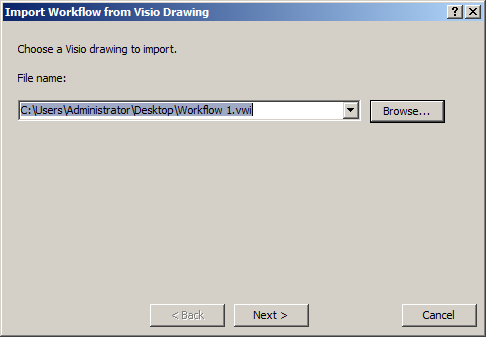
image

image

Click “Next”. (Maybe you get a message: “You must close all views of this workflow before importing this file.” Then stop the import. Close all views of the Workflow and restart from Step 21.)

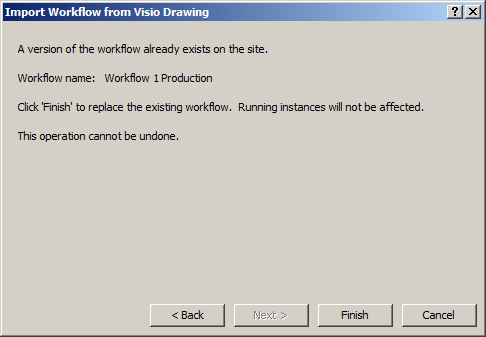
22. Now you see the this window:

image

That it!

23. Now the workflow designer opens:
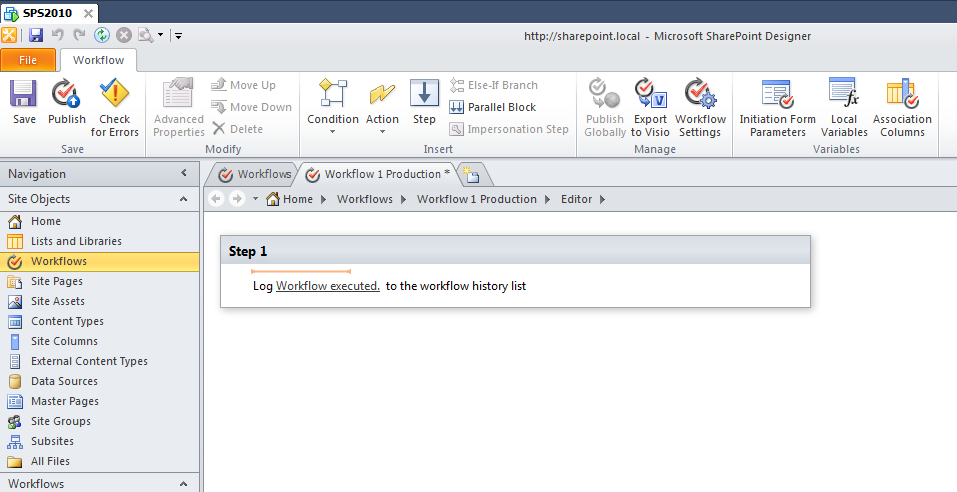
image

24. Now you can publish the workflow and test it…

25. Be as happy as me with that !!!

PS: Of course you can use any library as destination. In the sample above it does not have to be “Shared Documents” on “http://sharepoint.local” It could be another list or library as well!

74 comments

vinit Feb 28, 2011
hey dude, excellent post, really helped me alot, keep up the good work.
Hans Mar 17, 2011
Thanks man! Wonderful
Burdell May 17, 2011
AWESOME - thanks so much! I was about to make huge changes to a workflow at the client's request, and I really wanted to save a copy of all the work I'd already put into the thing, just in case she changed her mind later.
ikarstein May 18, 2011
Hi! - I'm happy about your success! :-) - Kind regards, Ingo
dudeu Jun 9, 2011
Excellent post, wonderful job which save my life.
ikarstein Jun 13, 2011
Thanks a lot :-)
John Jul 7, 2011
hi, really good job. Does anybody knows how to copy the forms of the workflow?
ikarstein Jul 14, 2011
Same question as Moe's.
Moe Jul 8, 2011
Really good work! Does anybody know how i copy the workflow forms with the workflow?
ikarstein Jul 14, 2011
Moe, this forms are XSN files, aren't they? You shout be able to copy them with SharePoint designer. Maybe you need to change their names in the Workflow Visio file. Just rename the Visio-Export-File to ".zip", open it as described in my article, and look for the workflow forms. I've seen them. - Try to copy them with SharEPoint Designer 2010 from the source location to the destination **after** importing the workflow. Ingo
Daniel Sep 28, 2011
hi ingo, this doesn't seem to work for me. i got a list workflow which includes two approval workflows with forms. i cannot find these forms in the zip file. in sharepoint designer i'm also unable to copy the forms; the only options i get are open and delete. everything works as you describe regarding the copying, but when i check the approval steps, not only the forms are missing, the outcomes are not there either. i cannot add any outcomes manually for some reason. so the copied workflow starts off as expected, sends the emails out and all, but the user cannot open the form, as they are not there. any ideas? thank you very much for your brilliant blog and especially these instructions. they have helped me copy a number of list workflows from my dev to production ... kind regards, Daniel
user Aug 25, 2011
Thanks a bunch for your excellent post here. Saved us a lot of time. THANK YOU!!!
thendral58 Oct 8, 2011
Hi Karstein, Thanks for the post......... Is it possible to create loops inside a List workflow.........like in a workflow with steps 1,2,3,4,5,6,7,8,9 ..... If "Yes" there will be steps in between like 1,2,3,4,5,6,7,8, else if "No" few steps will be skipped like 1,2,6,7,8 .... Is this possible.......in SPD2010 Worflows........ else atleast is it possible to copy a few steps in a workflow and paste them elsewhere in the same workflow....... Need a quick solution..... Thanks a lot Regards, Thendral
Ashutosh Dhande Oct 17, 2011
Hey Ingo, Great Post... Very Helpful... Thanxxxxxxxxxxx... \-Ashutosh
Steve Lloyd Nov 7, 2011
Props! This trick just saved me at least one mornings work!
Louise Fahys Nov 20, 2011
Such a great help! Thanks for the post. I spent quite a while trying to figure this out.
Rick Dec 2, 2011
Thanks heaps, this saved me a lot of time and fustration....
Collin Dec 7, 2011
AWESOME! This saved me about 1 million years worth of work! :-)
Khaniya Sunil Dec 10, 2011
Excellent Job man.....
ikarstein Dec 22, 2011
Thanks :-)
Senthil Dec 15, 2011
Awesome! It works like charm.. i have been running around for this and finally got urs and made my day easier. Though it looks a bit unorthodox, it works. Thanks, Senthil.
Osman Kumas Dec 19, 2011
This is the most helpfully post regarding to workflow moving I have ever read. Thank you
Vishwas Setty Dec 20, 2011
Hi, This is an amazing post, worked so very well... So very clear in understanding and following. One thing I would like to add is about renaming it. Once the file is renamed to .vwi.zip and to rename it back to .vwi use the folder options in the folder where you save and choose and uncheck "Hide file extensions for known file types". Then click rename and delete the .zip from it. Thanks again....
arut Dec 21, 2011
Thanks a lot
Donal Jan 9, 2012
When I look in the source workflow zip, it includes a workflow.xoml.rules file that is not in the target zip, should I copy this also? Also, the workflow.xoml file in the target zip is 2kb, whereas the file in the source is 27kb. Thanks
Brent Feb 2, 2012
Thank You!!!
Manoj Padmanabhan Feb 27, 2012
This worked like magic, thank you very much!
daxbabyar Mar 7, 2012
:( didn't work for me. Getting an error "The file could not be found or is not a valid .vwi" Can you help me...?
ikarstein Mar 8, 2012
hi! you have made mistakes while manipulating the file. you should start over. may be you have infopath forma to collect user input. if so you have to do some additional steps. ingo
Dheeraj Apr 16, 2018
what are the additional steps we need to follow for infopath forma..
Neuro May 21, 2012
I did this again today (after moving all my workflows from Prod to Dev) and then Tried going back from Dev to Prod I made the silly mistake of naming the workflows in dev what i wanted the final workflows to be called , so when I tried to put the new ones on Prod I had the same error you had So thats something to be aware of as well. Now I would just need to write some power shell script to cancel some of the running workflows and kick off the new ones, Ideally I would have liked to do it in PS but I havent found a decent script which would also let me check the state of a list item before it cancelled and started the new workflow unfortunately I have been told I dont have time to do that so im giving that stop-start business to the owners of the list items to do
Swapnil Mar 8, 2012
Man You R great that worked!!!!!!!!!
Waheed Mar 10, 2012
i am facing a problem all the previous steps fine when i add .zip extension to the both files system shows a message (if you change file extension, you may unable to use this file). after adding .zip extension my both files converted into zip format files. sharepoint designer unable to import it as .vwi file. how i could resolve this issue ??????
Waheed Mar 10, 2012
i resolve this issue by disabling hide extensions form known sites. thank you so much for nice post
MCM Mar 29, 2012
Good trick...
ssvv Apr 11, 2012
I am consistently getting "You must close all view of this workflow before importing this file." I closed all my SharePoint sites, designer and explorer, but when I reopen designer and attempt to import the vwi file, I get the same message. Please advise. Thank you!!
Chris H Apr 19, 2012
Good tip - I didn't know that the vwi files were simply zips. Bookmarking blog! I ended up modifying a bit for my case which was to copy a list workflow to a reusable workflow (to attached to a content type). Case being that I wanted to put multiple content types in a list that I had a workflow attached to, but didn't want list workflow to run on all content types. 1) Export list workflow, create new reusable workflow in same environment, export reusable workflow 2) Open both workflows as zip files 3) Copy the workflow.xoml file from list workflow to reusable workflow 4) Import reusable workflow On editing I needed to re-input some of the conditions and actions that were linked to other lists (although not all) but the structure of workflow and bulk of actions came through great. I had some quite complex security assignments in the workflow, these were retained so saved me having to rewrite. I'm pretty sure that this won't work if you aren't using content types & site columns already, and am tempted to compare the old and new xoml files to see where the discrepancies are. Thanks!
toe han Jul 19, 2012
Thank you very much... it save me alot of work.....cheer....
Kannan Aug 24, 2012
Amazing information. Saved me hell lot of time. Thanks a lot.
SivGee Sep 19, 2012
Awesome!! Thank you for that excellent post! Saved my day.
Nikkia T. Carter Nov 30, 2012
Awesome as always!!! Peace and blessings, Nikkia T. Carter
JYR Mar 1, 2013
I almost got confused by step 18. Thanks much for extra effort on the screen shots :)
Prakash Apr 1, 2013
Great Article...saved my time..Thank You ! :)
Khalid Eltahir Apr 17, 2013
You rock! What a time saver! Thanks a million.
Susan May 8, 2013
THANK YOU!!!!!!!
This worked like a charm for me.
Mike AF May 16, 2013
I just crossed this and believe I found a winner here! I can't wait to try this out at work!
Aymeric Jun 12, 2013
Thank you! Very useful :-)
Niyaz Jun 12, 2013
HI Karstein Is it possible to import the SPD workflows in cross domain?, means we have two different web applications and would like to import the SPD workflow in other web app. If Yes, could you please share your view. Thanks in Advance
Sukhver Jun 13, 2013
i'm not able to change it back to vwi format from zip, please help..
ikarstein Jun 13, 2013
What is your problem? You need just to rename the file. - Please be more specific.
Sukhver Jun 13, 2013
i'm able to change it to "filename.vwi.zip" the name changes to "filename.vwi". copy over the file to the folder but when i've need to change it back to vwi fomat, there's no .zip shown on the filename. I tried to change it to .vwi but its only changing the file name not the format. How can i change it back to vwi format if the .zip extension is not shown on the filename. Thanks
John Sep 20, 2013
I have two questions that other commenters mentioned but I did not see a reply. In step 18, it looks like you are copying the empty prod file to the original that actually contains the workflow. Is that a typo? And my original has a xoml.rules file. Should that be copied? Thank you
Vijay Chavan Sep 25, 2013
Thanks a lot ! It work's Successfully
Joe Oct 22, 2013
It may be a system security setting -- but, at step 18, I am unable to paste the wfconfig file into the other zip folder. Paste is greyed out. any ideas?
Monique Jul 29, 2014
I'm having the same problem, where I cannot paste the file into the other folder. Did you come up with a solution for that?
PegH. Nov 2, 2013
SWEET!
Arron Bey Nov 8, 2013
awesome!!! Thank you so much!!!
Von Mar 26, 2014
Thanks! I've tried this in Sharepont Online and I got the same error of "cannot be imported".
Waseem Jul 21, 2014
Joe, You have to unzip the file then you will be able to paste it. Once you paste it, zip it again, add extension .vwi and import it now
Sean Sep 11, 2014
I am able to confirm that this works with Sharepoint 2013 list workflows as well!!! - with one additional step... In the 2013 platform, instead of "workflow.xoml.wfconfig", the file you want to copy over is "workflowconfiguration.xml". Additionally, I had to make an edit in this xml file. In the tag, look for a parameter called "Name". The name of the workflow needs to be changed to match the name of the originally created workflow. This enables you to successfully import. Thank you for this original post!
Sean Sep 11, 2014
Another note - I ran into an issue on one of my workflows where as soon as I would try to replace the config file within the zip folder, it would corrupt the zip to some extent and made it unable to import. The solution was to use 7zip instead of Windows Explorer to open the zip archive when replacing the config file.
sherwin Nov 17, 2014
i'm not able to find the cancel in workflow information unlike on the manually created.
Ritesh Ratna Mar 25, 2015
Good Job Dude :-) You rock.
DBSmithy Apr 6, 2015
“You must close all views of this workflow before importing this file.” if you get this close out of the workflow information page, for SharePoint 2010 the one that says Workflow Information/Customization/Settings/StartOptions/Forms. If you're on this page it won't work! Go to the workflows section and import from there.
Dinesh Jul 23, 2015
If we do so, will the workflow variable also imported and exported automatically ?.
Jean Louis Aug 27, 2015
Tranks you
Pavlin Panev Oct 8, 2015
Thanks, man! That really worked for me, too! Thank you for the work around!
Peter Gregg Dec 29, 2015
It is exactly what I am looking for, well described. Here I found another good resource to get this job done easily and efficiently i.e. http://www.lepide.com/lepidemigratordocuments/sharepoint-to-sharepoint-migration.html
Shajeni Mar 22, 2017
Thanks!! It worked for me!!
Jain May 18, 2017
YOu save my day.Thank you so much bro...:)
Impressive!Thanks for the post.

Leave a comment

Your comment is reviewed before it appears. Your name is shown with the comment; your email is required for moderation but never published.