k blog.kenaro.com
← All articles

PS2EXE: Tool for “converting” PowerShell scripts to “standalone” EXE files

· Ingo Karstein

In the last days I created the tool “PS2EXE”. It is able to “convert” PowerShell scripts to “standalone” EXE files.

Project site here: http://ps2exe.codeplex.com – It’s ALPHA in the current version 0.1.1.0.

Version Update from 0.1.0.0 to 0.1.1.0 at 2011-08-22.

But: It does not convert the PowerShell script to an other language! It encapsulates the script with a lightweight PowerShell host written in C# and compiles the dynamically generated C# source code in memory to an EXE file. The resulting EXE is an .NET assembly that contains the source script encoded in Base64. The EXE includes all stuff that is needed to execute an PowerShell through the .NET object model. It is based on classes in the namespace System.Management.Automation that reperents the PowerShell engine. – Therefore the EXE file is not a real “standalone” EXE file. It needs PowerShell to be installed!!! And – of course – it needs .NET Framework v2.0. Furthermore “script execution” have to be allowed (see cmdlet: set-execultionpolicy). – The resulting EXE is “MSIL” and is able to execute as x64 or x86.

The tool “PS2EXE” itself is a PowerShell script! – It does the in-memory compilation and generates the EXE file. It uses the CSharpCodeProvider class of namespace Microsoft.CSharp.

The script is really simple. I contains a multiline string that represents the PowerShell host I’ve written. This is much more interesting than the PS2EXE.ps1 script itself. – Have a look into it!

Usage:

Call  the script with this parameters:

-inputFilePowerShell script file
-outputFilefile name (with path) for the destination EXE file
-debug(switch) generate debug info in the destination EXE file. The dynamically generated .CS file will stored beside the output EXE file. Furthermore a .PDB file will be generated for the EXE file
-verbose(switch) shows also verbose informations – if any.

Sample:

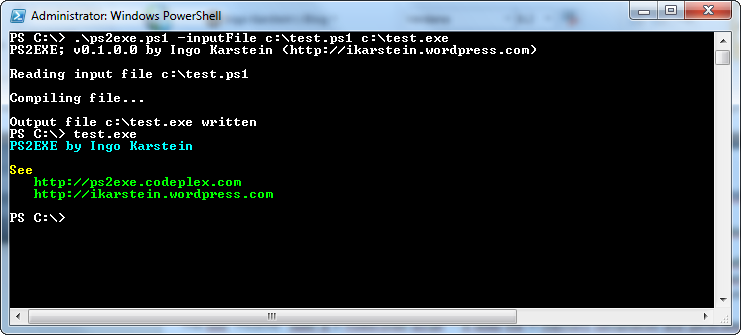
image

This creates “test.exe” out of the PowerShell source file “test.ps1”
Limitations: It’s not easy to create a fully functional PowerShell host such as “Console host” (powershell.exe) or “ISE” (powershell_ise.exe). So there may be functionality that does not work properly.

The generated EXE can also be calls using command line options. There are 4 options that are used by the PowerShell host:

-debugForces the EXE to be debugged. It calls “System.Diagnostics.Debugger.Break()”.
-extract:”Filename”Extracts the PowerShell script inside the EXE and saves it as “Filename”. The script will not be executed.
-waitAt the end of the script execution it writes “Press a key…” and waits for a key to be pressed.
-endAll following options will be passed to the script inside the EXE. All preceding options are used by the EXE and will not be passed to the script.

Sample:

I create a script file containing this line of code:

$args | Write-Host

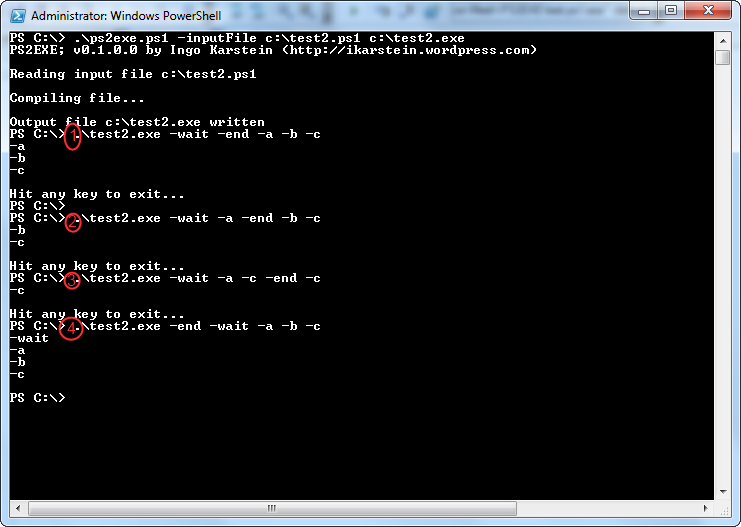
I save it as “c:test2.ps1” and convert it as EXE by using PS2EXE:

image

Sample 1.: “-wait” forces the “Hit any key…” message. All options following “-end” will be passed to the script.

Sample 2., 3. : The script will not get options preceding to “-end”.

Sample 4: “-wait” follows to “-end” and so it’s passed to the script. No message “Hit any key…”.
So. That’s it for the moment. Please feel free to modify the script and let me know.

Possible tasks:

  • Sign the script inside the EXE with code signature
  • Sign the EXE with code signature
  • Compress the script inside the EXE
  • Improve the PSHost implementation inside the EXE.

Have fun!

39 comments

Balazs Aug 12, 2011
Hello, it's a very useful app, however it's not possible to use .NET classes... because I got an error message while running my exe: "Cannot find type \[System.Windows.Forms.Form\]: make sure the assembly containing this type is loaded." What could be the problem? Thanks!
ikarstein Aug 12, 2011
Try to add the following line at top of your PowerShell script: \[System.Reflection.Assembly\]::LoadWithPartialName("System.Windows.Forms") \- Does it work?
paperlessme Oct 25, 2011
PShellExec handles .net forms objects in your scripts
anders Aug 13, 2011
if my PS script contain parameter,when I convert my PS script to EXE,it seems that it does not provide
ikarstein Aug 13, 2011
please provide some code ... ingo
anders Aug 16, 2011
If my PS script contain parameter,when I convert my PS script to EXE,it seems that it does not provide,for example: (my ps script are shown in the following) \============================ param(\[switch\]$loop) function ping-test { do { ping 127.0.0.1 } while($loop) } ping-test \============================ save it as ping-test.ps1, and convert it to ping-test.exe, but when I add the parameter “loop”, it does not work. How to make it work?
ikarstein Aug 22, 2011
It's not a bug, but it works diffrent ;-) See this version of your script ` write-host "here are all command line arguments" write-host $args` ` #initialize parameter variables $loop = $false #parse command line arguments in array $args if($args -icontains "-loop") { $loop = $true } function ping-test { param([switch]$loop) do { ping 127.0.0.1 } while($loop) } ` `#Get-Variable | ft name, value #check all variables ping-test -loop:$loop ` You have to use "$args" not "param(....)". You have to parse the $args array yourself! I've made a small improvement to the PS2EXE script. So it's version 0.1.**1**.0 now!
Arthur Dec 19, 2011
So PS2EXE does not work with named arguments?
loewenherz__ Sep 20, 2011
Thx for this !!
Fady Ghalayiny Nov 12, 2011
thank you man for this great tool but I found a little problem after converting my script to exe it exits automatically is there something that I can do to make it doesn't exit
dadang Mar 18, 2012
still no reply on this..i think their is no answer
Ryan McGee Nov 23, 2011
I keep getting an error when I try to run this. not sure if it is because I am running 64 bit version of .net 2.0 or not. Maybe you can offer some insight? PS D:scriptsps2exe> .ps2exe.ps1 -inputfile d:scriptsps2exetest.ps1 d:scriptsps2exetest.exe -verbose PS2EXE; v0.1.0.0 by Ingo Karstein (https://blog.kenaro.com) Reading input file d:scriptsps2exetest.ps1 Compiling file... Could not create the PowerShell .exe file because of compilation errors. Use -verbose parameter to see details. VERBOSE: c:UsersrmcgeeAppDataLocalTemp2rsi4trn.0.cs(196,55) : error CS0012: The type 'System.Dynamic.IDynamicMetaObjectProvider' is defined in an assembly that is not referenced. You must add a reference to assembly 'System.Core, Version=4.0.0.0, Culture=neutral, PublicKeyToken=b77a5c561934e089'.
Carlos McCray Apr 28, 2012
I get the same error. Did you ever fix this?
ikarstein Apr 30, 2012
Hi! - I think thats because you are running the EXE in .NET Framework **4.0** instead **2.0**. - Please use the new version of PS2EXE (v0.2.0.0): https://ikarstein.wordpress.com/2012/04/30/ps2exe-v0-2-0-0-improvements-platform-switch-x64-or-x86-or-anycpu-new-exe-config-file-for-supported-runtime/ Use switch **\-runtime20** Please report the result here. Thank you! Kind regards Ingo
Carlos May 2, 2012
Still a no go... PS C:PS2EXE-v0.2.0.0> .ps2exe.ps1 -inputfile "C:WindowsProdKey.ps1" "C:WindowsProdKey.exe" -runtime20 -verbose PS2EXE; v0.2.0.0 by Ingo Karstein (https://blog.kenaro.com) Reading input file C:WindowsProdKey.ps1 Compiling file... Could not create the PowerShell .exe file because of compilation errors. Use -verbose parameter to see details. VERBOSE: c:UserssageAppDataLocalTemp3wfmg54c.0.cs(196,55) : error CS0012: The type 'System.Dynamic.IDynamicMetaObjectProvider' is defined in an assembly that is not referenced. You must add a reference to assembly 'System.Core, Version=4.0.0.0, Culture=neutral, PublicKeyToken=b77a5c561934e089'. PS C:PS2EXE-v0.2.0.0>
ikarstein May 2, 2012
Hi! - This is strange. This Assembly (dynamics) is part of .NET Framework 4. But the C# compiler utilized in the PS2EXE script is set to use 2.0... So this assembly should be unknown to this compiler. Please check directory "C:WindowsSystem32WindowsPowerShellv1.0". Do you have a file "powershell.exe.config"? If so please post it's content. As another approach please open a PowerShell console and type in this command: `[system.reflection.assembly]::LoadWithPartialName("mscorlib")` Please post the output. regards ingo
revkev71 Jul 26, 2012
GAC Version Location \--- ------- -------- True v4.0.30319 C:WindowsMicrosoft.NETFramework64v4.0.30319mscorlib.dll
Ben Wylie Aug 8, 2012
Just wondering whether you have a solution to this? I am getting the same errors. Thanks Ben
deadairplane Dec 12, 2011
hello, I think it is a great tool however I have some troubles to convert in .exe scripts which contains Exchange and AD cmd-lets. Can you please help? Also I do not have PowerShell 2.0 on all servers, is it possible the .exe files to work there? Installing the PowerShell 2.0 is not an option, it require approvals, which I will never get.
ikarstein Dec 22, 2011
Hi! It's not possible to run a PowerShell script without PowerShell installed on the machine. PS2EXE does not really convert a PowerShell script to an EXE file. It only creates a PowerShell "runspace" = execution environment. Therefore PowerShell must be installed locally. Sorry. ;-) May be there is a way to include the PowerShell runtime files in the generated EXE but I did not try this jet. You also need to install all required extensions, e.g. Exchange, an each machine where you want to execute the generated EXE file. Kind regards Ingo
deadairplane Jan 2, 2012
Hello, Sorry for the misunderstanding! I mean does the PowerShell 2 required, not just PowerShell. PowerShell 1 is a prerequisite for installing Exchange Server 2007, and there is PowerShell 1.0 installed on all servers. All command lets which are included in my script (which have to be converted in .EXE), are available and running successfully on PowerShell1.0. As far as I understood PowerShell 2.0 is required the ps2exe.ps1 to work. My actual question was, does the PowerShell 2.0 required on all machines the EXE file to be executed, because on the most of clients it is version 1.0? The original script is working when it is not converted. Also could you please advise how the additional snapins can be included in the .EXE. The converted script does not work even on the original server, just because the .EXE does not recognize the Exchange cmd-lets even if I put the following line into the beginning of the script: Add-PSSnapin Microsoft.Exchange.Management.PowerShell.Admin Thank you in advance.
Denis Feb 21, 2012
Hello, Can I compile exe file without run black window (console for some massage)?
dadang Mar 18, 2012
how to configure not to auto exit the console????
Scott Pineau Mar 29, 2012
How do I get the get-credential to work properly? I found out how to do a reg hack to make it stay via command like, but when converted to exe it doesn't ask for both username and password.
aleks May 20, 2012
your script is SO useful!!! Thanks from Russian powershell system admin\`s!
Vladimir Jun 20, 2012
Well it works. However, Base64 is a plain text. Have anyone tried to decipher that? I've compiled a few scripts, newly created exe work fine. I'm just a bit worried that anyone with a decent knowledge of cryptology might break it. I'll try to that myself and post results. Thanks for sharing!
ikarstein Jun 20, 2012
Vladimir - it's definitly possible to decrypt it. - First you would use "ILSyp" to decompile the EXE and than you can copy the Base64 text into an online converter tool... Sorry ;-) Regards Ingo
dorou Nov 2, 2012
I have the same issue as Carlos. I do not have a powershell.exe.config file the output of \[system.reflection.assembly\]::LoadWithPartialName("mscorlib") is: GAC Version Location \--- ------- -------- True v4.0.30319 C:\\Windows\\Microsoft.NET\\Framework64\\v4.0.30319\\mscorlib.dll
Stefan Stranger Nov 26, 2012
Hi people, If you get the following error when running the ps2exe.ps1 script in PowerShell v3: "VERBOSE: c:\\Users\\username\\AppData\\Local\\Temp\\uft4bdcu.0.cs(196,55) : error CS0012: The type 'System.Dynamic.IDynamicMetaObjectProvider' is defined in an assembly that is not referenced. You must add a refe rence to assembly 'System.Core, Version=4.0.0.0, Culture=neutral, PublicKeyToken=b77a5c561934e089'." Just startup PowerShell version 2. How? Open Run, type PowerShell.exe -version 2 /Stefan
paul jorgensen Mar 3, 2013
For the encryption issue, there are many possibilities for encrypting the package or script. For vbscript, I have encrypted with vbscript itself. This can also be done with powershell, or you can create an encrypted self exe type of thing... just saying there are lots of possibilities. This is a cool tool - ps2exe... I have done some powershell host coding in C# and it is a lot of work so I am impressed...
Dave May 21, 2013
Seems to work but the display that's not used in the option i select does not change, and i see any errorException calling SetBufferContents with 2argyments;not implemented.powershell.ps2exehostrawui.setbuffercontents access is denied exception from hresult 0x80070005m#e########-#accessdenied
dave Jun 12, 2013
works great apart from a single command Update-SPSolution –Identity "test.wsp" -LiteralPath "C:\\Program Files\\test\\solution\\test.wsp" –GACDeployment For some reason the exe file fails but the ps file is fine error - a positional parameter cannot be found that accepts the argument test.wsp
Scheffsache Jul 22, 2013
i cant start it. i receive the message: no date found may be read error or file protected. but access is given and the script works fine :/
Sajid Oct 24, 2013
Its a great tool..But I have a question wether I can create a single exe using multiple ps1 files. I have a main script which calls other scripts.
Rafael Jul 4, 2014
Hi dude, first off all thanks for the great work. I really need some help with the execution of the .EXE My .PS1 file need to receive on default parameters from files created inside of the folder where .EXE will be executed. using the command line with parameter "Split-Path $MyInvocation.MyCommand.Path" my .PS1 work as well but when i try execute to the .EXE file the command line return to me the information of this parameter "Split-Path $MyInvocation.MyCommand.Path" as "C:\\". how can I change this to recognize the same folder where the .EXE was located?
Kumar Aug 3, 2015
this code works for me if(!$ScriptRoot) {$ScriptRoot = (Get-Item -Path ".\\" -Verbose).FullName}
Saideepak Mar 11, 2015
If i am invoking one power shell script from the other power shell script..how to compile it..
ikarstein Mar 12, 2015
There is no option to compile a depending script into the "main" script. You need to merge them manually before compilation.
Paul_dH Aug 15, 2016
Hi Ingo, First, thanks for the great script! I'm creating a gui for the app to ease the use for my colleges, are you interested if I share the code? It's a simple WPF form with options that are passed to ps2exe.ps1. Regards, Paul

Leave a comment

Your comment is reviewed before it appears. Your name is shown with the comment; your email is required for moderation but never published.