k blog.kenaro.com
← All articles

Walkthrough: Add List Event Receiver dynamically at runtime in SharePoint 2010

· Ingo Karstein

This time a tiny neat walkthrough of how to add an Event Receiver at runtime in SharePoint 2010.

Let’s say you have a SharePoint site that your colleagues already use. In this site you have an existing list. Now you want to add some automation to this existing list. – You cannot deploy the list as List Definition w/ List Instance again in a VS 2010 SharePoint project, because the list exists and the data must not be touched.

One solution is to add an List Event Receiver that is contained in a VS2010 solution package.

1. You create a Empty SharePoint 2010 project in Visual Studio 2010.

2. Now you add an “Event Receiver” project item
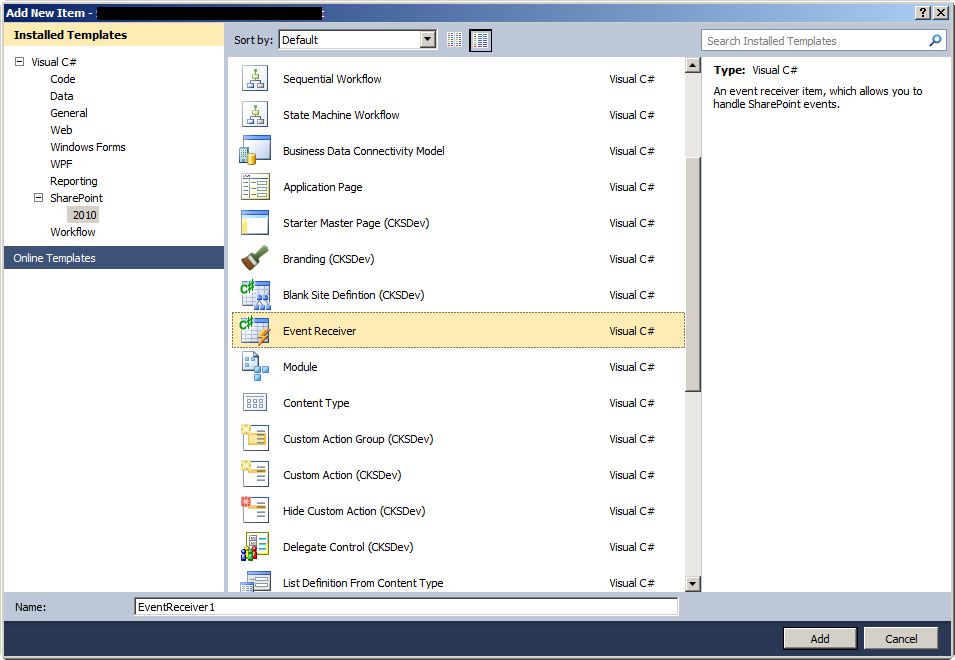
image

3. Now you add the events you want to handle. Select “List Item Events” and “Custom List”.
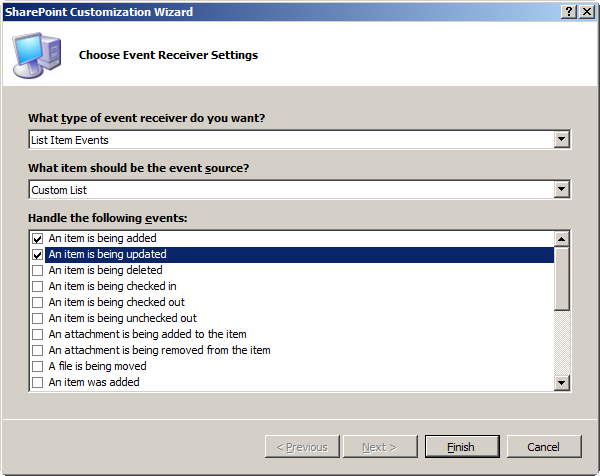
image

4. Implement some functionality in the newly created Event Receiver class.

5. Now create or open an Feature Event Receiver for the SharePoint feature that will configure the event receiver. – You have to create a new feature or use an existing feature… If you create a new feature event receiver you have to uncomment the methods “FeatureActivated” and “FeatureDeactivating”.

6. Add this code to the “FeatureActivated” method:

try {
    SPWeb web = (SPWeb)properties.Feature.Parent;
    SPList l = web.Lists["My SharePoint List"];
    if( l != null )
    {
        bool found = false;
        foreach( SPEventReceiverDefinition er in l.EventReceivers )
        {
             if( er.Class == "Full.Namespace.Qualified.Class.Name.Of.Your.Event.Receiver.Class")   {
                 found = true;
                 break;
             }
        }

        if( !found )
        {
            SPEventReceiverDefinition newERD = l.EventReceivers.Add();

//the next line is only valid if the event receiver class is in the same assembly as the feature event receiver!!!

            newERD.Assembly = System.Reflection.Assembly.GetExecutingAssembly().FullName;
            newERD.Class = "Full.Namespace.Qualified.Class.Name.Of.Your.Event.Receiver.Class";
            newERD.SequenceNumber = 1000;

//you may add more “received” events in the following line.

            newERD.Type = SPEventReceiverType.ItemUpdated | SPEventReceiverType.ItemAdded;
            newERD.HostId = l.ID;
            newERD.HostType = SPEventHostType.List;
            newERD.Update();
            l.Update();
        }
    }
}
catch {
}

This installs the event receiver when the feature gets activated.

7. Add this code to the “FeatureDeactivating” method:

try {
    SPWeb web = (SPWeb)properties.Feature.Parent;
    SPList l = web.Lists["My SharePoint List"];
    if( l != null )
    {
        SPEventReceiverDefinition d = null;
        foreach( SPEventReceiverDefinition er in l.EventReceivers )
        {
            if( er.Class == "Full.Namespace.Qualified.Class.Name.Of.Your.Event.Receiver.Class" )
            {
                d = er;
                break;
            }
        }

        if( d != null )
        {
            d.Delete();
            l.Update();
        }
    }
}
catch {
}

This will remove the event receiver when the feature gets deactivated.

8. Now remove the “Elements.xml” file in the Event Receiver project item in the Solutions Explorer:
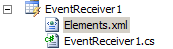
image

9. For me this works very well.

11 comments

Peter Holpar Jul 7, 2011
Why should we use custom code / feature receiver if this is possible declaratively as well? See this walkthrough: How to: Create an Event Receiver for a Specific List Instance http://msdn.microsoft.com/en-us/library/ff398052.aspx Peter
ikarstein Jul 15, 2011
You are right. Thank you for the link. - But: It's possible with code and so I liked to show how. Ingo
Mathijs Vlasveld Jul 14, 2011
Hi ikarstein, Thanks for the nice walkthrough. This was exactly what I needed! But since I had multiple event receivers to add/delete, I added two following two methods to the feature: private void AddEventReceiver(SPList list, string name, string className, SPEventReceiverType type) { if (list.EventReceivers.Cast().Where(e => e.Name.Equals(name)).ToList().Count == 0) { SPEventReceiverDefinition eventReceiver = list.EventReceivers.Add(); eventReceiver.Name = name; eventReceiver.Assembly = System.Reflection.Assembly.GetExecutingAssembly().FullName; eventReceiver.Class = className; eventReceiver.SequenceNumber = 2001; eventReceiver.Type = type; eventReceiver.HostId = list.ID; eventReceiver.HostType = SPEventHostType.List; eventReceiver.Update(); } } private void DeleteEventReceivers(SPList list, string className) { var eventReceivers = list.EventReceivers.Cast().Where(e => e.Class.Equals(className)).ToList(); foreach (SPEventReceiverDefinition eventReceiver in eventReceivers) { eventReceiver.Delete(); list.Update(); } } Cheers, Mathijs Vlasveld
ikarstein Jul 15, 2011
Mathijs, thank you for your comment and sample code! kind regards ingo
ragesoft Mar 26, 2012
Isnt it posible to combine 2 types into one receiver? or must i add 2 receiver objects to the same list if i want adding and updating? The chain with "ItemAdded | ItemUpdated" wont work for me :( Thx for this tutorial!
ikarstein Mar 26, 2012
this does not work for me either... you need X associations for X events ;-)
Urs Wedershoven Nov 6, 2012
Nice Post, does exactly what I need. @Peter: You do not always know which lists the EventReceiver needs to be attached to. So a dynamic approch (based on an existing field, for instance) is a great thing. Also this offers the opportunity to add a receiver to multiple lists at once without having to write a declaration for each one. Regards, Urs
vijay Jan 31, 2013
hi when i added document programatically my itemAdded event reciver is not firing ?If i change in Synchronous in Element.xml its firing why?itemAdded is asynchronous event then why i need to fire synchronous?pls help me
Mah Jun 13, 2013
Hi is it possible to add event receivers to share point list definition and application pages that is created in VS 2010?
ikarstein Jun 13, 2013
"add event receivers to app pages" ? => No. - Why should you? An application page has nomally code behind . Why would you ever need event receivers there? "Add event receivers to list definitions?" => not directly. you can deploy event receivers by xml. See: http://msdn.microsoft.com/en-us/library/ms460929.aspx
Chris Webb Nov 13, 2014
Beautiful Ingo. Just what I was looking for.

Leave a comment

Your comment is reviewed before it appears. Your name is shown with the comment; your email is required for moderation but never published.