k blog.kenaro.com
← All articles

Walkthrough: Create custom SharePoint 2010 list form for deployment in a Visual Studio 2010 project

· Ingo Karstein

(This is part 1 of 2. See link below.)

Today I want to show you how to create a custom list form for deployment within a custom list template developed in Visual Studio 2010.

Download or update or modify my demo code on Codeplex.com:

http://spcustomlistformdemo.codeplex.com/

For me I was difficult to figure out this way. I could not find a good documentation about this topic so I’ll write ist Smile - If you found another description please post a link in the comments below. Thanks!

1. Create a Site Collection in your SharePoint 2010. Mine is called “http://sharepoint.local/sites/listform”

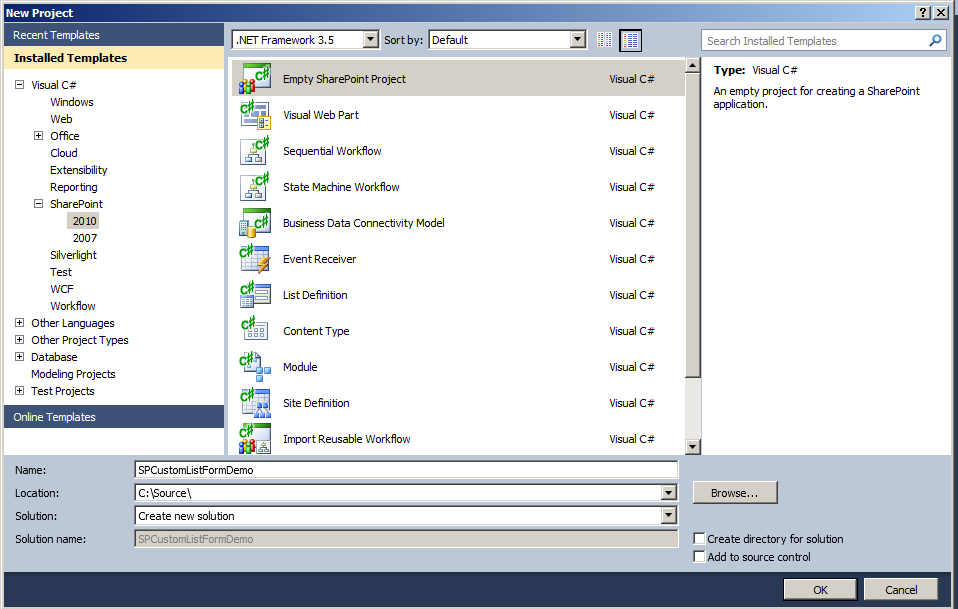
2. In Visual Studio 2010 create an empty SharePoint 2010 project.

image

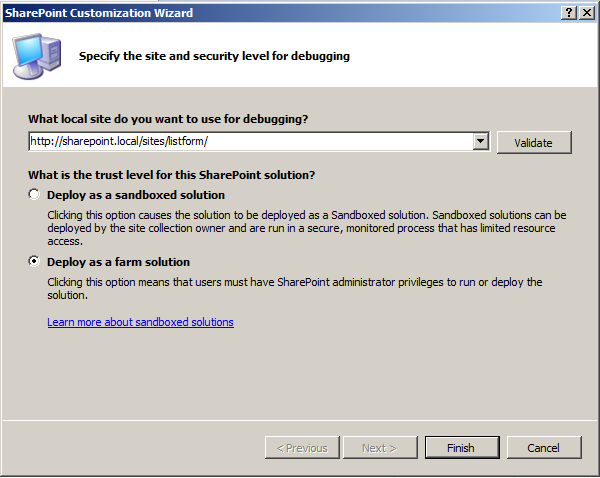
Choose “Deploy as farm solution!”

image

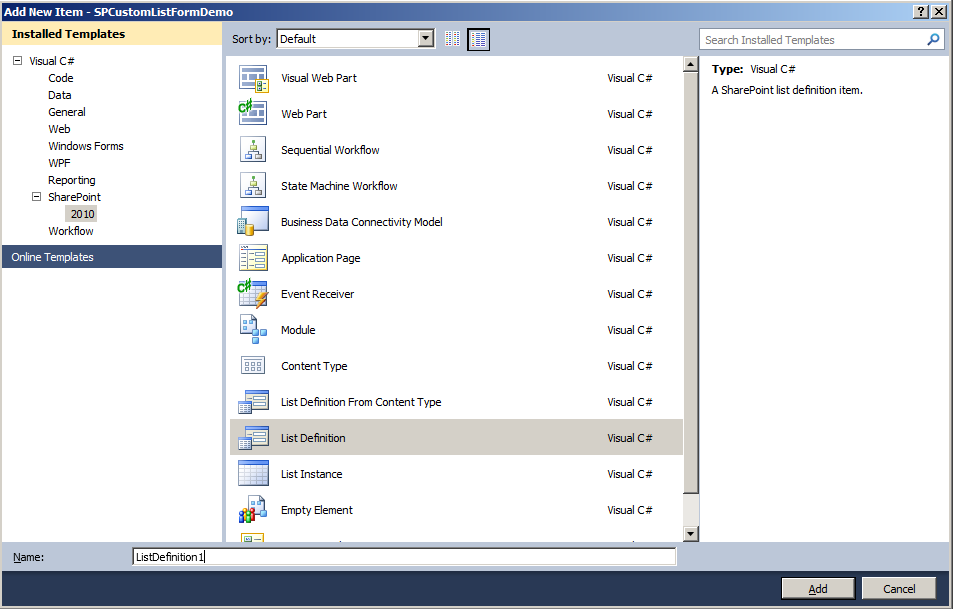
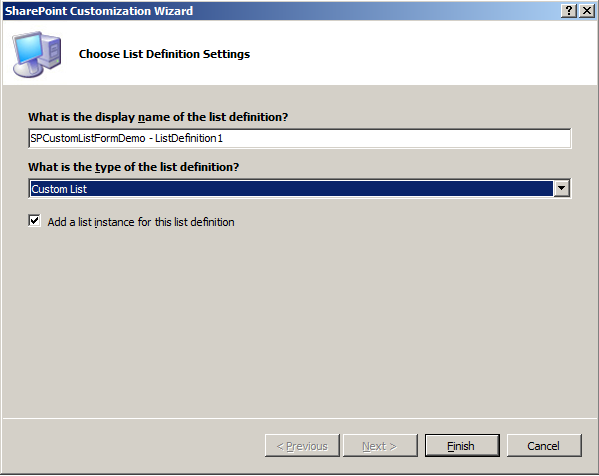
3. Add new item to you project: “List Definition” with type “Custom list” and with “Add a list instance”
image

image

4. Deploy this project “as is”.

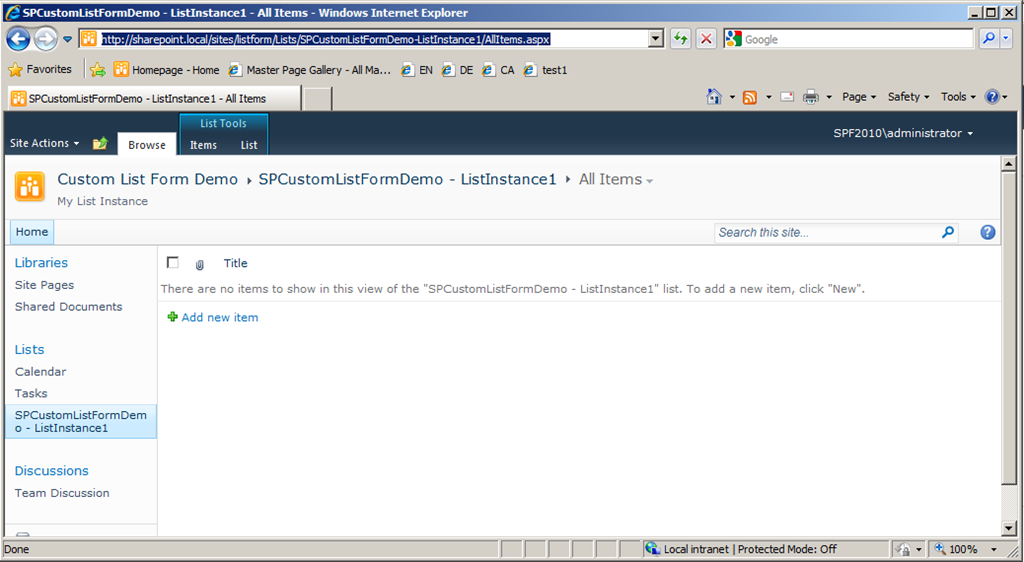
5. Have a look in your browser:
image

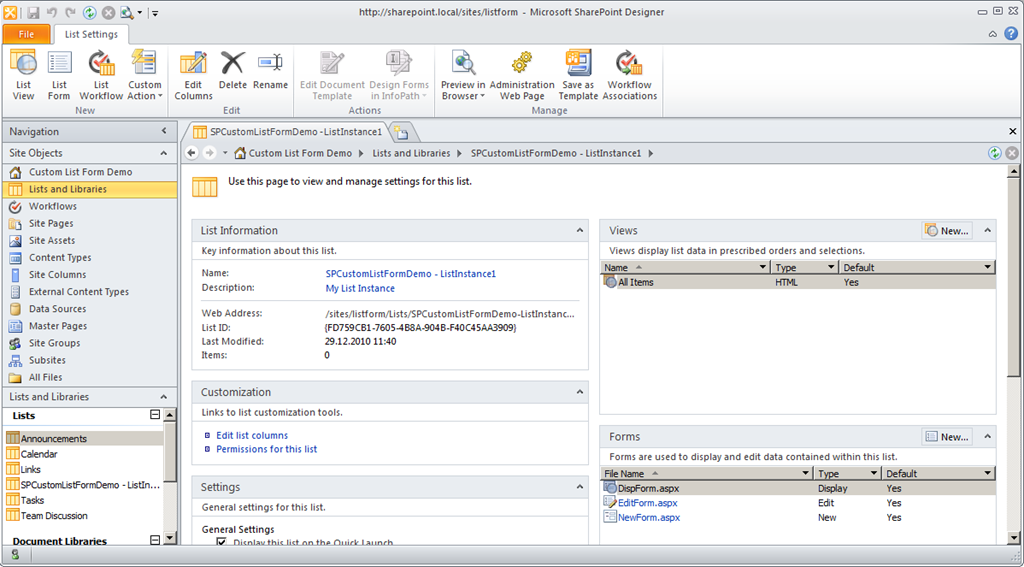
6. Open SharePoint Designer 2010 (SPD) and open the site “http://sharepoint.local/sites/listform”. Open the deployed list “SPCustomListFormDemo – ListInstance1”
image

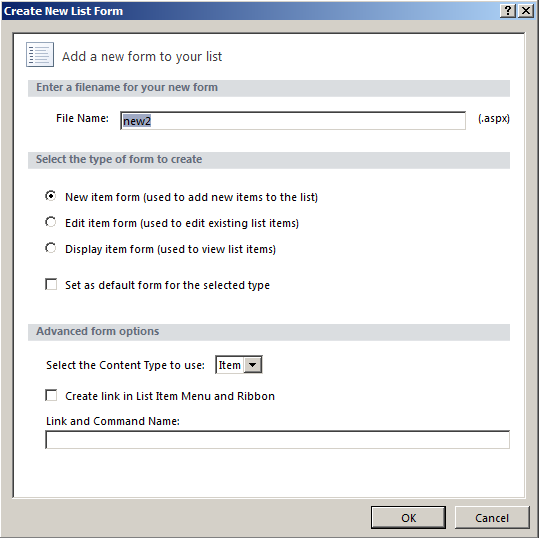
7. In the SPD in the List Settings of “SPCustomListFormDemo – ListInstance1” click the Ribbon tab “List Settings”. Then click “List Form”. You get this dialog:

image

Enter the name of the new list form, e.g. “new2.aspx”.
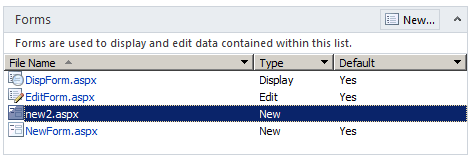
8. In SPD in the List Settings in the “Forms” view you can see your newly created list form.
image

Select it and open it for edit.

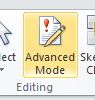
Click “Advanced Mode” in the Ribbon !!!

image

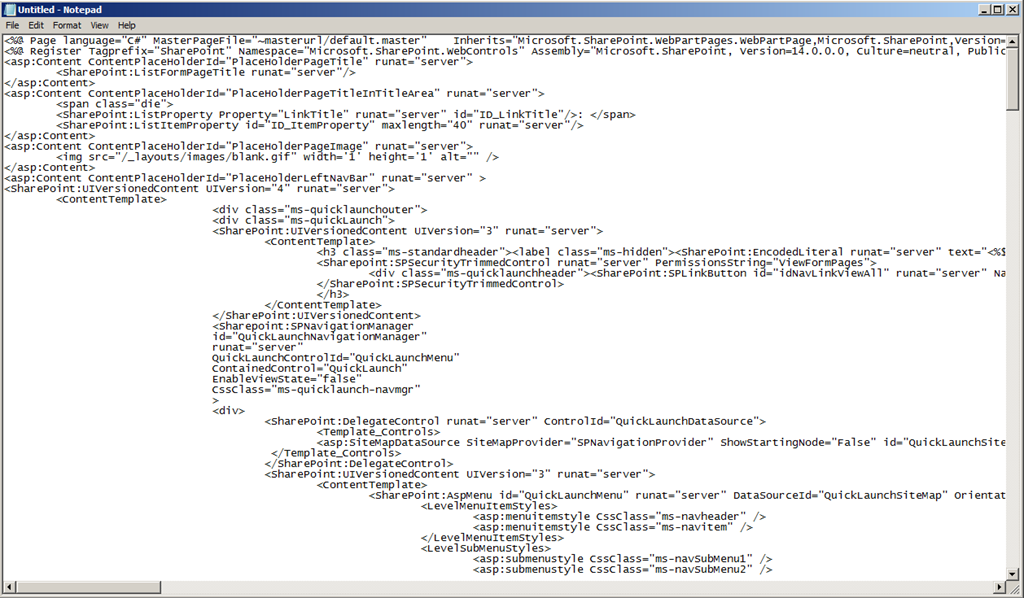
Select all the content of the new2.aspx file.

Copy the HTML code.

Open NOTEPAD and paste the HTML code.
image

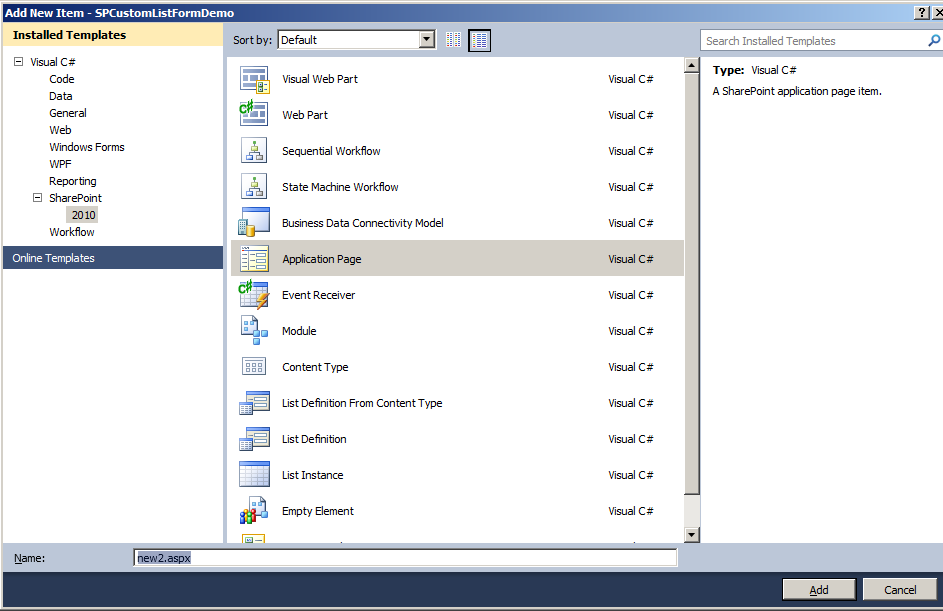
9. Go into your project in Visual Studio 2010. There add a new project item of type “Application Page”.  Name it “new2.aspx”.
image

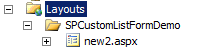
The page will be created in folder “LayoutsSPCustomListFormDemo”

image

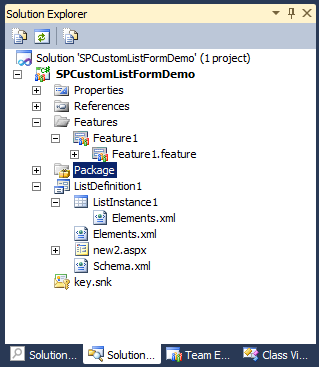
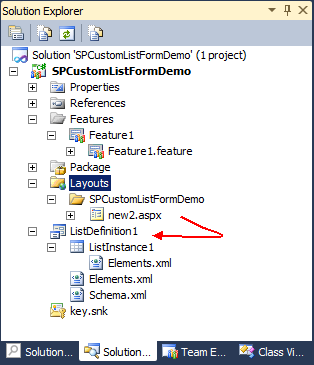
With “drag & drop” Move the new2.aspx note to your List Definition:

image

Remove the “Layouts” folder. You get:

image

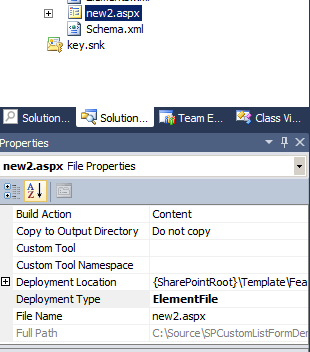
Select “new2.aspx” in the Solution Explorer and change its property “DeploymentType” to “ElementFile”
image

10. In VS2010 open “new2.aspx” for edit. Delete all content of the file except this two lines:

image

Replace the “DynamicMasterPageFile” attribute name through “MasterPageFile”. You get:
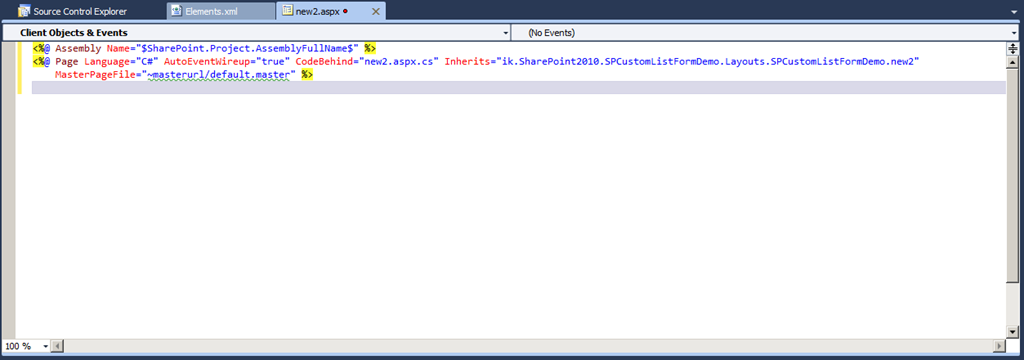
image

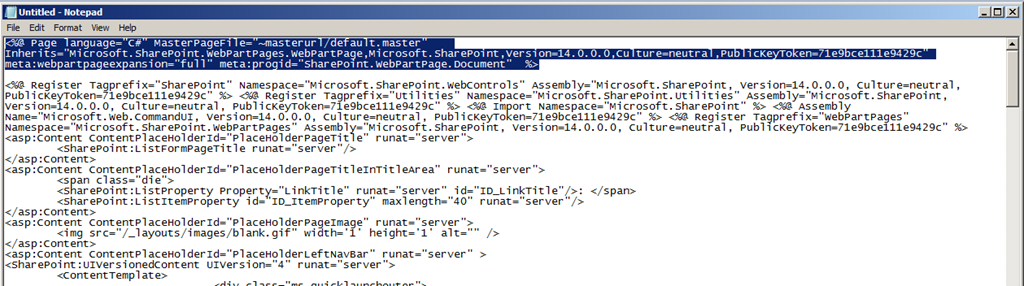
11. Got to NOTEPAD. Remove the “Page” tag as marked in the screenshow:

image

Select the rest of the file and copy it to the clipboard.

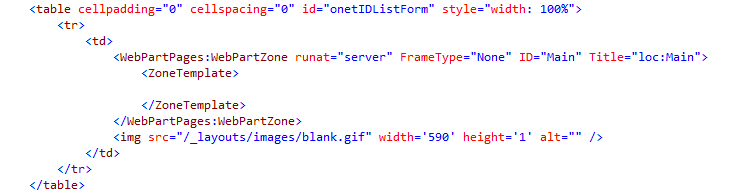
Now remove the complete content of the “ZoneTemplate” node. – Do not remove the “ZoneTemplate” node itself. Now the specific part of “new2.aspx” looks like this:

image

(There is a “DataFormWebPart” included in the “ZoneTemplate” node. This you remove by following the last step from above. But at runtime SharePoint will create a new DataFormWebPart in the Web Part Zone with ID “Main”. That’s the reason why we need to remove the copied and pasted Web Parts: It’s one of such a DataFormWebPart too much on the site after SharePoint creates the new one on runtime…)
12. In VS2010 paste the code into “new2.aspx”

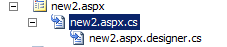
13. Open “new2.aspx.cs” from the Solution Explorer:
image

Insert this “using”:

image

Replace the base type of your class definition from “LayoutsPageBase” to “WebPartPage”.

14. In the Solution Explorer open “schema.xml” of your list definition:
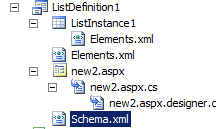
image

Scroll to the bottom of the file and find this part of XML code:

image

Replace the “SetupPath” attribute of the Form node with type “NewForm” with this value:

features$SharePoint.Feature.DeploymentPath$ListDefinition1new2.aspx

You get:

image

15. Deploy your solution.

16. Go into the browser, reload the list and “add new item”.

Now your custom list form will be used!

The URL in the Browser is identically to the first try! Why is it “NewForm.aspx” and not “new2.aspx”?

-> SharePoint uses “NewForm.aspx” as page for “Add new item” but internally redirects to the defined “New Form” of the list.

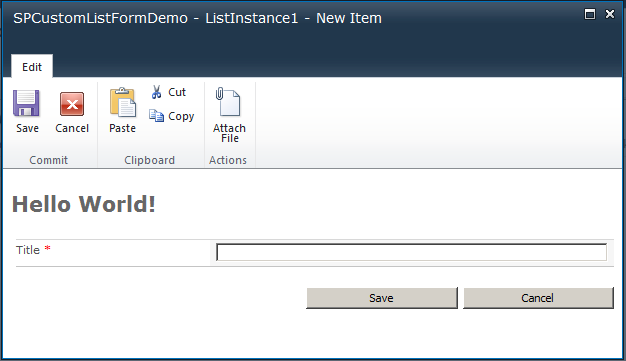
You can add some code for demo purpose to help you identifying your custom list form. For that reason I inserted

Hello World

into the the ASP Content PlaceHolder “PlaceHolderMain”:

image

The final result:

image

  Now you can do your own staff on your custom list form.

In Part Two I want to show you how to use you own form input fields instead using the at runtime inserted DataFormWebPart Web Part. …


It’s done: Part 2: https://blog.kenaro.com/2011/01/24/walkthrough-create-custom-sharepoint-2010-list-form-for-deployment-in-a-visual-studio-2010-project-part-2/

86 comments

Johan van Dijke Jan 23, 2011
Great post, have you already published Part Two?
Nigel Jan 24, 2011
Hi - thanks for the imformative blog post - did you ever write the part II you mention?? I am very interested in writing my own list forms that do no use the data view web part, but am having trouble finding any examples. Please please write up part II ASAP and let me know about it Many thanks Nigel
ikarstein Jan 24, 2011
Hi! I wrote part 2 today :-) - I'd like to hear your feedback !! Kind regards Ingo
Nigel Jan 24, 2011
Also - I get a "system cannot find file specified error" when deploying the final version (but have not really debugged it yet). Could the value for "SetupPath=features$SharePoint.feature.DeploymentPath$ListDefinition1new2.aspx" be incorrect?
ikarstein Jan 24, 2011
Hi Nigel, did you modify the demo project? - I used the checked in version today. It works for me. Did you set the double qoute before "SetupPath" ?!?! You may send me your source code. kind regards ingo
Nigel Jan 25, 2011
Its pretty strange - when I check the ULS it shows that it is the master page causing the file not found: "System.IO.FileNotFoundException: The file /Test/Lists/SPCustomListFormDemo-ListInstance2/masterurl/default.master does not exist." I am specifying it as you do, and the weird thing is that your project works fine, and also my form opens in designer just fine. The path "/Test/Lists/SPCustomListFormDemo-ListInstance2/masterurl/default.master" definitely does not look right - do I need to do somethink for it to resolve the ~masterurl token correctly?
Nigel Jan 25, 2011
Ok figured it - problem was between chair and computer - I did not change the base type of my class
Jeremy Jul 29, 2015
Hi Nigel, can you expand on this a little?
Gaurav Gat Jan 24, 2011
Hi, Nice solution,but I think you went too far. Istead you could just create a custom list and modify the add new item form in infopath form designer. much easire and faster. Though it can't be done for all scenarios,but for simple forms I think infopath must suffice. Atma Namste, Gaurav.
ikarstein Jan 24, 2011
Hi Gaurav, of course you could create a list form with InfoPath and deploy it with VS2010. But I wanted to show how it works for SharePoint Server 2010 and SharePoint Foundation 2010 too! - Would you like do add a InfoPath demo to the CodePlex project? Kind regards Ingo
Nigel Jan 24, 2011
Its worth noting that there are some drawbacks to both InfoPath generated forms, and SharePoint Designer forms: \- Both require additional pieces of software to develop, hence additional licensing costs \- InfoPath forms for SharePoint are restricted in that they do not allow any custom code to be associated with them - i.e. there is no "Develop" tab shown in IP Designer \- Likewise with SharePoint designer custom forms - limited to HTML, Javascript and XSL - no chance to encode any .Net on the form other than through adding custom developed webparts \- SharePoint Designer customised forms result in large chunk of XSL being added to HTML markup - more data to move from server to client and difficult to maintain So you should choose an approach that suits - if you are making simple modifications to a form (eg look and feel, validation etc.) then these two approaches suit. If you are doing something a little more involved where server-side .Net code is required, then developing a custom replacement ASPX makes more sense Cheers, Nigel
ikarstein Jan 24, 2011
Hi Nigel, I agree to your opinion! InfoPath is too expensive because it requires SharePoint Server 2010 and the Enterprise CAL. (See this page: http://sharepoint.microsoft.com/en-us/buy/Pages/Editions-Comparison.aspx) A tiny litte ASPX site is much more satisfying in much situations... Kind Regards Ingo
Rohit Sep 24, 2013
Hi Gaurav, InfoPath can be quick solution, but when the requirement goes complex, then we have to go for custom approach, and anyways InfoPath is not in future.. MS is going to stop it.
sandeep Mar 10, 2011
Can you use it as SandBox solution?
sam Mar 28, 2011
When i try to create a new form i get the error- Could not save the list changes to the server. I tried it with the other lists in the site.But i get the same error..
Vladimir Apr 5, 2011
When i try to create a new form i get the error: "File Not Found". Can you check my project?
ikarstein Apr 5, 2011
I think "file not found" is caused by a wrong project item definition. you have to set the aspx file to be "ElementFile" in the Solution Explorer -> Property pane. And you have to specify the correct deployment location in the lists "schema.xml" file. These are typical problems. - I would have a look into your code... just mail me. Ingo
Hege Aug 30, 2012
"you have to set the aspx file to be “ElementFile” in the Solution Explorer" Thanks a lot!
Jo Raleigh Apr 15, 2011
Hi, I'd been told to publish this in sharepoint view so the client machine needn't install MS Access to view and update/print Is this right? Do you know any Sharepoint expert who would help me publish my MS Access database application., pls give quote.. regards. Jo.
ikarstein May 4, 2011
Hi Jo! I do not understand the question: > I’d been told to publish this in sharepoint view so the client machine needn’t install MS Access to view and update/print > Is this right? This topic is not specially related to MS Access or SharePoint's Access Service Application. What's the problem with your MS Access database? Do have difficulties to use them with Access Services? Kind regards Ingo
Jake May 24, 2011
In our SharePoint projects we use a tool to customize SharePoint Forms: Advanced Forms for SharePoint (http://www.kaldeera.com) Hope this helps.
ikarstein May 26, 2011
HI Jake! Thanks for your post! I do not know this tool but may be I will have sometimes a need for something. In my case (and blog post) the aim was to deploy such forms with VS2010... If I only have designer tools I use SharePoint Designer 2010 to manipulate list forms. Kind regrds Ingo
enti Jun 26, 2011
Hello. Thank you for perfect SharePoint article. I am still a beginner in SharePoint and I don't know to to access in page\_load method the SharePoint list item. For example Title? I have created list like you wrote and I want that title is prefilled. So I want to add to method: protected void Page\_Load(object sender, EventArgs e) { //Something to fill title in my list } Hmm...Is this possible? Thank You very much
ikarstein Jun 27, 2011
Hi Enti! only a short answer for now. it's 1 a.m. here ;-) Look at SPContext to access the related SPListItem object - if there is one. In the SPListItem object try to access the indexer with index "Title". (Something like this: SPContext.Item\["Title"\]) - The is also a class SPBuildInFieldId Try it's property "Title" as value for the indexer. Like this: SPContext.Item\[SPBuildInFieldId.Title After you changed a field don't forget to call the method "Update" on the SPListItem like this: SPContext.Item.Update(). Or SPContext.Item.SystemUpdate(false). Have a look at MSDN. Just search for SPListItem and SPContext. Ingo
enti Jun 27, 2011
Hello. Thank you very much for your help and again thank you for this perfect article. Can I have another question? I try to understand this code and I am not sure why this: "Replace the base type of your class definition from “LayoutsPageBase” to “WebPartPage”." Why is needed to replace LayoutsPageBase to WebPartPage. Maybe the answer is trivial but I search on MSDN and it give me nothing. Sorry for asking but can you please explain me why is needed this for this type of aspx file. Thank you for your help.
ikarstein Jun 27, 2011
Hi Enti! Layout pages are typically used for so calls "application pages". This pages (normally) do not belong to a special site / web. These are settings or configuration pages or pages for custom functionality. Normally they are located in the LAYOUTS folder in the SharePoint hive. They are "linked" into a site collection context by using the "virtual" path "\_layouts" in the URL. So they use a diffrent MASTER page (application.master). WebPartPages instead belong to special content and they are stored inside webs and they are located in the content database. If you create a new feature for SharePoint, e.g. a special settings page for lists, than you create a layout page. this page gets the lists unique ID and collects some data from the user. This page is not customizable in the SharePoint UI. But if you create a Site Definition with a custom home page you would create a Web Part page. This page will (may) be customizable for users to add content or Web Parts. Everywhere you use this WebPartPage it can be diffrent. Their content is stored in the database. - A layout page does only processes data that it loads from somewhere and stores to somewhere. \- I'm not sure whether I could explain this a little bit. - Feel free to ask again!! Ingo
enti Jun 28, 2011
Hello. Thank you for explanation. I think that I understand it right now:) Sorry for that but I have another maybe simply question;) I have also read the part 2 of this article and again everything is working without any problem and this article is perfect. I have create some custom list with some fields and everything was working. After that I have added in SharePoint some content to this list. I have about 3 rows in my list. After That I add another field and some code behind to my custom list in Visual Studio. Build it and Deployed it. My 3 rows are gone. I understated that this is correct situation but my question is how can I deploy (upgrade) my list with new functionality and old content will be still in my list. Hmm....Is this possible? Thank you for your help.
Shayne Judkins Jul 3, 2011
This is great. I really needed this! I am having one small issue... When my custom ASPX page loads (I click Add new Item), I am getting an "UnSafe" type error. Well, to be specific: Description: An error occurred during the parsing of a resource required to service this request. Please review the following specific parse error details and modify your source file appropriately. Parser Error Message: The base type 'ik.SharePoint2010.SPCustomListFormDemo.Layouts.SPCustomListFormDemo.new2' is not allowed for this page. The type is not registered as safe. I am pretty sure i can fix it by modifying the web.config file (and adding it as a "" for the site), but I am curious why that wouldn't be mentioned in your tutorial if it was a requirement, so perhaps I did something wrong? Thanks! Shayne
ikarstein Jul 15, 2011
Sorry for being late. - Please check your Project Items. In the "Properties" pane there is an entry like "Safe Controls" or so. there you should specify the type to be a "Safe Type". Ingo
Phil Jul 5, 2011
Hi, Thanks for the blog, really precise and helped me alot. I have used your test code and it works fine, however I have one issue when trying to implement the code into my solution. My solution has a structure as follows: Features \-> Lists \-->List.Feature \-->List.Template.xml Lists (folder) \-->Correspondence (List Definition) \-->Correspondence \-->Elements \-->Elemnts \-->Schema I can add the new2.aspx into my list definition, however to reflect the changes in my structure, do I need to update the follwoing line of code in the schema? features$SharePoint.Feature.DeploymentPath$Correspondencenew2.aspx The error I am getting on deployment is... Could not find a part of the path 'D:DevSourceTEST.PB.SharePointTEST.PB.SharePoint.RegisterListsListsCorrespondence LDnew2.aspx'. D:DevSourceTEST.PB.SharePointTEST.PB.SharePoint.RegisterFeaturesListsLists.feature Note the double occurance of Lists in the path. Any help/pointers would be greatly appreciated. Cheers, Phil
ikarstein Jul 15, 2011
Phil, did you deploy "new2.aspx" as "ElementFile" in your project item? - Maybe thats the problem. Ingo
Phil Jul 25, 2011
Hi I was able to get the form to load by removing a reccurance of the 2nd 'List' on the path on the projectItem.spdata file. Cheers for the reply. Great blog.
John Sep 5, 2012
great, had the same problem. that did the trick. thanks!!
Lidia Jul 11, 2011
Hi! I've some problems once the infopath has been deployed and I want to do some changes in the form then I can't publish again.
enti Aug 13, 2011
Hello. I want to ask if is possible to create something like this with external list? I tryed everything but with noe success. I don't know how to create new/edit/display forms for external list with code behind. Have you try something like this?Is possible this? Thank You
Kailas Aug 17, 2011
Could you please provide me line of demo project to download? Currently codeplex has no link to download.
ikarstein Aug 17, 2011
on codeplex click on the "source" tab? there you should be able to download the souce code! - did this work? ingo
Kailas Aug 18, 2011
Thanks ikarstein It works.
Sangeet Ahuja Sep 5, 2011
Nice and precise post. Minor Update : I had to remove the following attributes from Page tag to get around run time errors. Removing these tags resolved the issue. 1\. AutoEventsWireup 2\. CodeBehind 3\. Inherits Thanks Sangeet Ahuja
ahmadsaber Oct 19, 2011
Hi, nice post :(, however whenever I am publishing the solution I am still getting the SharePoint new form nor the customized one ?? Thanks
azerty2012 Nov 4, 2011
Hello Ingo, very good post, and it runs perfectly. However, the point #11 cause a problem to me. The form is quite empty, only title appears, exactly how your final result. I surely misundestood something, but how to let fields appear in the custom form? syncerely, Bernard
azerty2012 Nov 4, 2011
hello Ingo! nice post and it works perfectly. However the custom form does not contains all the fields of the list : only the title. maybe I have misunterstood something, howto let all the fields appear? thanks Bernard
jenny Nov 18, 2011
hi ikarsstein, i followed ur all steps.but i am getting few errors. first i got "autoeventwireuo" is not allowed on this page. so i removed it from page directive. now it says "The base typThe base type 'CustomListWithForm.Layouts.CustomListWithForm.new3' is not allowed for this page. The type is not registered as safe. " i made entry in safecontrols of web.config. but no use.What am i missing can you please help? its very urgent...!!! Thanks.
Ueli Schwarz Dec 19, 2011
Great post, As mostly no code behind is needed the paghe declaration in the aspx File cpounl be replaced with Like this the Files \*.apsx.cs & \*.designer.cs can be deleted and the adding of the usings & adaptation of the namespaces are void.
Dhawal patel Dec 28, 2011
I got the below error when i create it with above method please help me out System.IO.FileNotFoundException: The file /sites/work/Lists/CustomList-ListInstance1/masterurl/default.master does not exist.
Guru Feb 1, 2012
Hallo Karstein, I have done everything as you said but iam getting an error when i click the add new item Parser Error Description: An error occurred during the parsing of a resource required to service this request. Please review the following specific parse error details and modify your source file appropriately. Parser Error Message: Could not load type "inherits="whatever given here". It shows the error at the first line of the . What could be the problem ?.. Thank you.
ikarstein Feb 2, 2012
Hi "Guru" Dinesh, we know us - you can call me. - just ask Nobert :-) The "Inherits" attribute does not contain a valid type name or the corresponding assembly is not loaded. please check my sample code for details. Check class names and namespaces. the "Inherits" attribute contains a full qualified type name with namespace AND class name. Ingo
swaroop Oct 12, 2012
Hi guru, Can you tell you, how you resolved this issue. Its troubling me
ikarstein Oct 12, 2012
Hi! "Inherits" specifies the code behind class for the page. You need to deploy the code as assembly to the server. The assembly is part of the WSP solution package. During deployment the assembly is installed to the GAC. Sometimes the deployment does not work well. Please check if the page's code behind assembly is available in the GAC on every web frontend server. Regards Ingo
swaroop Oct 13, 2012
Thanks Karstein, its worked. I have missed one of the tags in aspx.
nerre Feb 3, 2012
Is this possible to do with a List Definition From Content Type. As I created in VS2010? Can you help me by explaining what to write here: Setup Path = "features $ SharePoint.Feature.DeploymentPath $ G5s Docs EditeFormG5S.aspx" My project units G5S.ArchiveSolution And List Definition From Content Type called G5s Docs?
Robin Klass Apr 18, 2012
Hi Ingo, nice posting, but i recently found a better way to get the same results. The clue is to use FormTemplates (SharePoint RenderingTemplates) instead of customizing the hole form itself. Well see http://www.3guysonsharepoint.com/?p=987 for details. greetings Robin
samo May 12, 2012
I have the same issue as 'Jenny' in comment no. 6 but you didn't replay on her, would you pls do I'm using SPServer 2010
roy May 30, 2012
Dear ALL, I am able to follow the steps and customize the form and also customize the controls by placing them in tables and td etc. My question, is this the right approach for a project having 100+ forms? Is this the only way we have right now to make a deployment packages? Please advise. Highly appreciated Roy
igor Jun 8, 2012
Hello, I have same problem as Jenny and Samo. Everything was OK, until I deploy solution on site collection with custom master file. When I i use default master on this site, everything is ok again, but i lose all my master file customization. Can you help me with this issue? Thank you very much for your help.
Anna Jul 5, 2012
Hello! I got everything correct, but no text "Hello World!" in the form/ In what may be the problem?
bhagwant Jul 12, 2012
how can we create the same for sandbox solution ?
KS Jul 31, 2012
Very interesting piece! I want to re-arrange the fields on my editform - how can I achieve this? (because in your sample you remove the dataformwebpart completely and I guess SP generates its own at runtime!?). I tried leaving a modified dataformwebpart in the editform but SP ignores this Your help appreciated! thanks, KS
Nikkia T. Carter Aug 9, 2012
Hi Ingo! Is there a way to do this with the Upload form of the Document library? I need to change or add custom instructions. Peace and Blessings, Nikki
ikarstein Aug 9, 2012
I thought about that last week. I would recommand to remove the upload ribbon butten and creste a new one. AFAIK "upload" is not a "normal" list form.
Vaibhav Sep 7, 2012
Hey... The method is nice! But tell me how should it be different if I create a normal custom webpart in VStudio and put it on, say, dispform.aspx by hiding the actual OOB webpart (using string id in URL "toolpaneview=2"). What I'll do in the code file is simply take the value of the ID from the querystring and based upon that will display the values. Can you please tell me what this can't do as compared to the method you have suggested? The only reason for this comment here is that I found it a bit complex! Correct me pls if I am wrong or I'm missing something. Regards, Vaibhav
swaroop Oct 13, 2012
hi kartein, This blog was really helpful. I have tried with library too, its worked and now how can i do this for default libraries like Records library and drop off library in Records centre site. Please suggest.
Natasha Gondi Oct 27, 2012
Instead of writing "Hello World" i want to redirect it to a webpart page.. how can we do it..?
Natasha Gondi Oct 27, 2012
Instead of writing "Hello World", i want to redirect it to the webpart .. how can we do it..?
Natasha Gondi Oct 27, 2012
It will be very helpfull if tell me how to do this soon... And your this post was nice... It worked for me ... Thank You... :)
Cesar Dec 14, 2012
Thanks for the helpful article. I found that when I drag the new2.aspx form from the Layouts folder into the Lists folder (and this may be an issue only for deeply nested sites rather than top-level sites), an error occurs when trying to deploy. The error indicates that "Could not find a part of the path" ...\\Lists\\Lists\\*list foldername*\\new2.aspx The only way I was able to fix it is to open the file SharePointProjectItem.spdata within the Visual Studio folder containing the list definition and modify the file directly without using VS2010. You will see that the path contains a relative path starting with "..\\Lists\\*list foldername*\\new2.aspx - this should be edited to remove everything and leaving only the new2.aspx **Important** you should do this while VS2010 is closed otherwise it senses that the file was changed and when it reloads, it actually sets the deployment type to "NoDeployment"
Cesinco Dec 15, 2012
Thanks for the helpful article. I found that when I drag the new2.aspx form from the Layouts folder into the Lists folder (and this may be an issue only for deeply nested sites rather than top-level sites), an error occurs when trying to deploy. The error indicates that "Could not find a part of the path" ...\\Lists\\Lists\\*list foldername*\\new2.aspx The only way I was able to fix it is to open the file SharePointProjectItem.spdata within the Visual Studio folder containing the list definition and modify the file directly without using VS2010. You will see that the path contains a relative path starting with "..\\Lists\\*list foldername*\\new2.aspx - this should be edited to remove everything and leaving only the new2.aspx **Important** you should do this while VS2010 is closed otherwise it senses that the file was changed and when it reloads, it actually sets the deployment type to "NoDeployment"
Raheel Feb 8, 2013
Very nice and useful article, thanks for sharing this information. One thing is missing (that I found in this article) that in new2.aspx page "" must be added means that this line alongwith Page directive should not be deleted from source. I was facing issue without using this line then I view your source files and realized that I have missed this. Thanks Regards, Raheel Ahmed
Raheel Feb 8, 2013
Very nice and useful article, thanks for sharing this information. One thing is missing (that I found in this article) that in new2.aspx page must be added means that this line alongwith Page directive should not be deleted from source. I was facing issue without using this line then I view your source files and realized that I have missed this. Thanks Regards, Raheel Ahmed
Raheel Feb 8, 2013
\=> Assembly Name="$SharePoint.Project.AssemblyFullName$" in aspx page
Elango P Apr 16, 2013
Perfect!!!!. This solved my requirement perfectly and saved my time. Thanks a lot Karstein.
Ricardo Jul 4, 2013
Good morning, I tried to follow the steps in your article, which in my opinion seems very good, but they are my first steps with VS, and I've only gotten to the point of creating the new2.aspx page. Visual Studio I make VB type page instead of C# type. please, can I do some change in VS to be of type C#? Thank you very much, greetings
Cesar Aug 2, 2013
Ingo, Let me tell you that I appreciate very much the thorough walkthrough of creating the custom form. I wanted to know if you have also documented how to create a list view form. For example, I am creating a solution that will deliver a list and apart from the standard AllItems.aspx view, I wanted to also add a custom view, such as a view that uses the "Group By" feature. Can you shed some light?
Phill Aug 28, 2013
This changes the form for whole list. How could i change form for one specific content type ?
vadim Oct 13, 2013
thank you !!
Amit Nov 1, 2013
Hi Guys, I am new to sharepoint development and I need help in similar note. I have a custom requirement, for example in the new list item form using Visual Studio 2010 for Sharepoint 2010 - I need to have text box search field, based on the search criteria, upon Search button click, I have to go to sql database and bring the matching record(s)(Name(text), EmployeeId(Value)) and show them in a drop down list. Upon one employee selection from the drop down list again I need to go the database(or I can grab everything in first trip and have it available) and grab the other fields like (badge number, supervisior, current department, and so on) and pre-populate the these other fields in the form. Then other remaining feilds are filled by user(HR) like department they are transffering to and so on, upon Save the item will be inserted in the list. I believe the list table will be created automatically upon custom list form design which is developed in share point project through visual studio 2010 or will I have to do anything to create this table in sharepoint database. Any help on this be greatly appreciated. Thanks very much in advance.
pm Nov 21, 2013
Will this work for a document library edit properties form?
Balebel May 16, 2014
Great Post !!! Thank you !!!!!
zdeno Jul 8, 2014
Hello I found your blog post and I really appriciate your work, effort and contribution...I have one , for me "no solution" problem...I am former winform visual basic and c# programmer...now I have some issue with sharepoint...I need to create an user control with logic behind to read from filesystem and Active directory...this my user control needs to be pasted to sharepoint's list's NEW form...please, can you give me and advice - some 5 step tutorial how to archive it ad include user control inside listform? I am really greatfull for anny help
mirek_z8irek Jul 18, 2014
Hello pm, it works fine for documentlibrary with editform. Only one difference i had faced is a setuppath to editform in schema.xml file for doclib definition. I have set value of setuppath with the following: SetupPath="Features\\$SharePoint.Feature.DeploymentPath$\\\\.aspx Best regards MZ
kv Jul 23, 2014
Hi I have tried similar example in SP 2013. But it doesn't work. Is there something different in SP 2013.
chinka Sep 18, 2014
Thank you so much for this great article. And, for the record, just as Ueli Schwarz and Sangeet Ahuja said, I removed the 'AutoEventWireUp', 'CodeBehind' and 'Inherits' properties form the 'Page' tag in the ASPX file, and I also deleted the '.cs' file and everything beneath it. And it works just fine ! Cheers... Chinka
piter Feb 11, 2015
where images????????
ikarstein Mar 5, 2015
good question. They are back now.
Stephen York May 18, 2017
I've struggled to find a way to do this but finally stumbled across this article. Thank you SOO much

Leave a comment

Your comment is reviewed before it appears. Your name is shown with the comment; your email is required for moderation but never published.