Walkthrough/Solution for Workflow Error in SharePoint 2010 State Machine Workflow: Event "OnWorkflowActivated" on interface type "Microsoft.SharePoint.Workflow.ISharePointService" for instance id "<guid>" cannot be delivered.
Today I got the following error and did not find a clear description and solution for it:
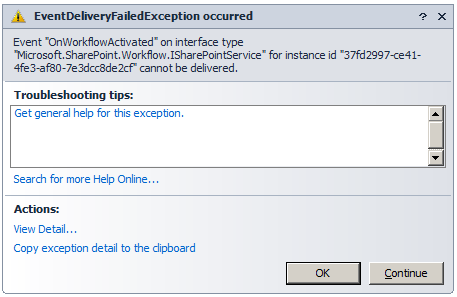
Error message: “Event “OnWorkflowActivated” on interface type “Microsoft.SharePoint.Workflow.ISharePointService” for instance id "
The Solution: …in my case was a missing “EventDriven” activity.
My “Initialization” state looks like this:
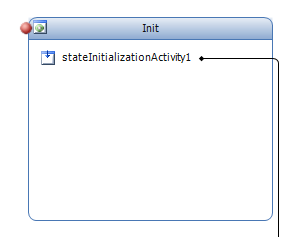
I’ve added a “StateInitialization” Workflow Activity and added some code to it. But this is a SharePoint Workflow and it needs at least an “OnWorkflowActivated” event driven activity.
Let’s walk through the solution:
1. Drag a “EventDriven” activity to the “Init” state. Its name may defer in your project.
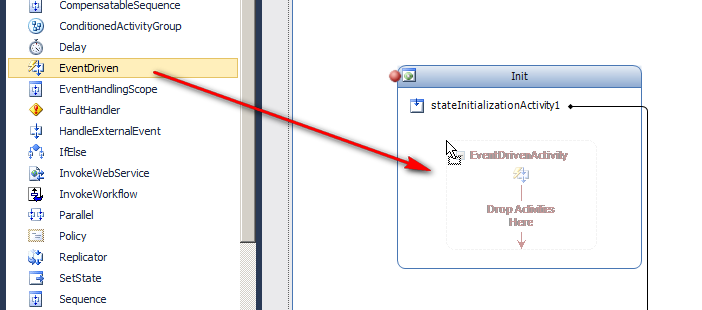
2. Name the EventDriven activity “onWorkflowActivatedHandler”. (You can use an other name too!)
3. Double click the EventDriven activity.
4. Drag a “OnWorkflowActivated” activity from the Toolbox pane into the “onWorkflowActivatedHandler” activity:
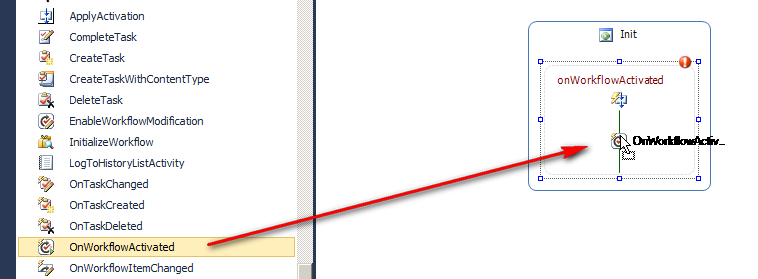
5. Add a correlation token to “onWorkflowActivated1”!!
6. Add a binding for “WorkflowProperties” !!!
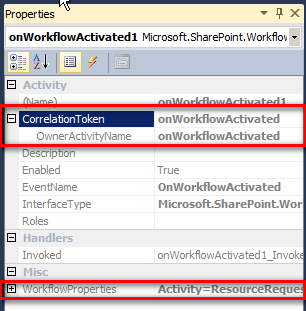
7. That’s it. Now you can add activities behind “handleExternalEventActivity1”… As you like.